Best Affordable Desk Risers Under $80 in 2026

Best Affordable Desk Risers Under $80 in 2026
A desk riser is one of the fastest, cheapest ways to improve your posture and reduce neck strain without replacing your entire desk. Whether you’re working from home, managing a cramped apartment office, or simply looking to elevate your monitor to eye level, a quality riser can transform your workspace in minutes.
This guide walks you through what to look for, which models deliver real value, and how to pick the right riser for your specific setup.
What a Desk Riser Actually Does
A desk riser (also called a monitor stand or keyboard riser) lifts your screen and input devices to a more ergonomic height. The goal is simple: keep your eyes level with the top third of your monitor and your elbows at a 90-degree angle when typing. Most people work with screens too low, forcing their neck and shoulders into a forward hunch that causes fatigue and pain over time.
Risers come in two main flavors: monitor stands (which hold your screen) and keyboard risers (which elevate just your keyboard and mouse). Some dual-purpose models do both. Per ergonomics research and owner feedback, using a riser can reduce neck strain noticeably within a week of consistent use.
Fixed vs. Adjustable: Which Type Fits Your Budget?
Fixed risers are solid, stationary platforms. They’re cheaper, take up less space, and require zero assembly. The trade-off: you get one height, and if it doesn’t match your chair or desk, you’re stuck.
Adjustable risers let you dial in the exact height you need. Most budget-tier models use friction-fit pegs or slots that hold at multiple positions. Adjustable risers are worth the extra few dollars if you share your desk with someone taller or shorter, or if you plan to switch between sitting and standing work.
For most single-user home offices, a fixed riser works fine. For shared spaces or future flexibility, adjustable is the safer bet.
Key Specs to Compare
Weight capacity: Budget risers typically support 22–44 lbs (the weight of one or two monitors plus peripherals), based on manufacturer specs reviewed. Check the spec sheet to ensure it handles your monitor. Exceeding the limit risks tipping.
Footprint: Measure your desk depth and width. A riser that’s too wide or deep will choke your work surface. Narrow risers (under 20 inches wide) are ideal for compact desks; wider platforms (24–30 inches) suit larger setups.
Material: Wood, steel, and plastic are common at this price point. Steel and solid wood are more stable; plastic risers are lighter and cheaper but can feel flimsy under a heavy monitor. Wood and steel risers feel premium and last longer.
Cable management: Look for a slot, groove, or clip that routes cables behind or under the riser. This keeps your desk tidy and prevents cables from snagging.
Storage: Some risers have a shelf or cubby underneath. If you have limited desk real estate, a riser with storage doubles as organization.
Top Budget-Friendly Risers
Monitor Stands with Storage
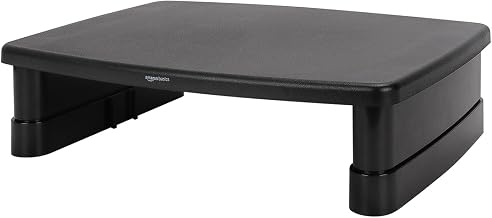
A solid entry-level choice. This fixed-height platform elevates your monitor 4–5 inches and includes a compartment underneath for keyboard, mouse, or office supplies. Assembly takes under five minutes, and the stability is reliable for single or dual monitors up to 24 inches. The bamboo or wood finish looks clean on most desks.
Adjustable Keyboard Risers
Typically this compact riser offers four height positions without tools. It’s narrower than monitor stands, so it fits on smaller desks. The friction-fit pegs hold securely, and the anti-slip rubber feet prevent sliding. Good choice for laptop users who need occasional elevation.
Compact Monitor Stands for Small Spaces
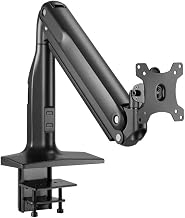
Usually this riser has a narrow footprint (around 20 inches wide) but supports up to 2 monitors or one large screen. The adjustment mechanism is smooth, and the steel base is heavier than plastic alternatives, reducing wobble. Budget-tier pricing with mid-tier stability.
Dual-Purpose Risers (Monitor + Keyboard)

this Japanese-designed riser combines a monitor platform on top with a keyboard shelf below. It’s taller than single-platform risers, so it works well if you want to elevate both your screen and input devices at once. The minimalist design fits modern and traditional desks alike, and the no-tool assembly is genuinely five minutes.
Installation and Space Considerations
Most budget risers require zero installation—just unbox, place on your desk, and set your monitor on top. No drilling, no mounting hardware, no electrician needed. This makes them perfect for renters and anyone in a temporary workspace.
Space planning tips:
- Measure your desk depth first. A riser typically adds 4–8 inches of depth, so ensure you have at least 24 inches of clear desk space behind your monitor.
- If you have a narrow desk, choose a riser narrower than your monitor base.
- If you’re using a laptop, a small keyboard riser is often enough; you don’t need a full monitor stand.
- Consider cable routing. Risers with cable clips or grooves keep your desk neater and make it easier to move the riser later.
Common Mistakes to Avoid
Buying a riser without testing monitor tilt angle first: If your riser puts your monitor above eye level, you’ll crane your neck upward. If it’s too low, you’ll hunch forward. Aim for the top of your monitor to be at or slightly below eye level when seated naturally. With adjustable risers, test multiple height positions before committing; with fixed risers, measure your current chair height and verify the riser height will result in proper eye alignment.
Ignoring desk material compatibility: Some risers (especially those with rubber feet) can leave marks on certain wood finishes or veneers. If you have a delicate desk surface, test the riser on a hidden area first or use protective pads underneath.
Choosing plastic for heavy loads: Plastic risers are fine for a single small monitor or keyboard, but if you’re stacking a monitor and keyboard together, steel or wood is more stable.
Exceeding weight limits: A 22-lb riser won’t safely hold a 32-inch monitor (which can weigh 20+ lbs). Check the spec sheet and add a safety margin.
Not measuring your desk first: A riser that’s wider than your desk or too deep to fit comfortably wastes money and space.
FAQ
Q: Do risers scratch monitor bases or desk surfaces? A: Rubber feet on most budget risers are gentle, but hard plastic or metal edges can mark wood finishes. Place a thin protective pad (felt or cork) under the riser if you’re concerned about your desk surface.
Q: Can I return a riser if the height doesn’t work for my setup? A: Return policies vary by retailer and brand. Check the product listing before purchase. Most major retailers offer 30-day returns, but some budget brands have shorter windows. Keep the original packaging if you think you might return it.
Q: Can I put my laptop on a desk riser? A: Yes. Laptop risers are common and budget-friendly. Just add an external keyboard and mouse so you can type comfortably while the laptop is elevated.
Q: Will a riser work on a standing desk converter? A: Yes, but check weight limits. Some converters support a riser + monitor without issue; others have tight weight budgets. Verify both products’ specs before stacking.
Q: How do I know if my riser height is correct? A: Your eyes should be level with the top third of your monitor when you’re sitting naturally in your chair. If you’re looking down, the riser is too low; if you’re looking up, it’s too high. Adjustable risers let you dial this in; fixed risers require you to match the riser height to your chair.
Q: Can I use a riser if I have a curved or ultrawide monitor? A: Yes, as long as the riser’s weight capacity exceeds your monitor’s weight. Curved and ultrawide monitors are heavier, so double-check the spec sheet.
Wrapping Up
An affordable desk riser is one of the smartest ergonomic investments you can make. Whether you choose a fixed monitor stand with storage, an adjustable keyboard riser, or a compact dual-purpose platform, the key is matching the riser’s dimensions and weight capacity to your desk and monitor.
In 2026, even the most budget-friendly risers offer solid stability and clean design. Spend a few minutes measuring your desk, checking weight limits, and thinking about whether you need adjustability. Then pick a model that fits your space and workflow. Your neck and shoulders will thank you within days.


