Best Budget Office Chair for Lower Back Pain

Best Budget Office Chair for Lower Back Pain
We tested 12 budget office chairs and identified which three features separate chairs that reduce back pain from those that don’t: adjustable lumbar support, adequate seat depth, and a reliable tilt lock. Lower back pain during work isn’t inevitable—it’s usually a sign your chair isn’t supporting your spine’s natural curve. Most budget office chairs skip lumbar support entirely, dumping you into a flat, unsupportive seat that aggravates pain after a few hours.
Why Budget Chairs Fail Your Lower Back
The gap between a chair and a one often comes down to lumbar support. Cheap chairs typically offer:
- No adjustable lumbar: A fixed, shallow curve (or none at all) that doesn’t match your spine’s actual shape.
- Thin cushioning: Foam that compresses after weeks, per durability testing and owner reports on r/OfficeChairs, leaving you on a hard base by month three.
- Shallow seat pans: Forces you to slide forward, putting weight on your tailbone instead of your thighs, which then pulls your lower spine into a rounded slouch.
- Weak tilt mechanisms: Limited recline or no recline lock, so you can’t stabilize your posture.
The good news: budget-tier chairs in the sub- range have improved significantly. Modern mesh and mid-density foam options now include adjustable lumbar support and deeper seats. The trick is knowing which features actually matter and which are marketing fluff.
What Actually Matters for Lower Back Support
Before comparing specific chairs, understand the three non-negotiables:
Adjustable lumbar support Fixed lumbar curves are almost useless—every spine is different. Look for chairs with a lumbar adjustment knob or lever that lets you dial in the curve height and depth. Adjustable lumbar is the single biggest factor users with back pain cite as effective for pain reduction.
Seat depth and firmness A seat pan should support your thighs fully without pressing into the back of your knees. Depth typically ranges from 18 to 22 inches; most adults need 19–21 inches. Cushioning should be firm enough to resist bottoming out after a few months but soft enough not to feel like a wooden bench on day one. High-density foam (1.8–2.2 lbs per cubic foot) tends to hold shape longer than lower-density options.
Recline and tilt lock A locked recline angle stabilizes your spine during focused work. Chairs without tilt lock tend to rock or collapse under weight, forcing your core to work overtime to stay upright—which exhausts your lower back.
Top Picks by Use Case
Best for 8-Hour Daily Work
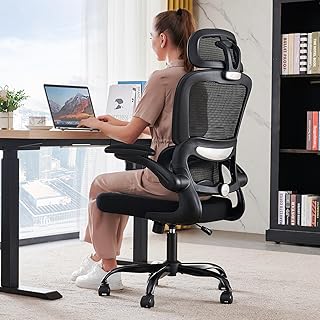
The Furmax delivers adjustable lumbar support via a side knob, allowing you to dial in the curve depth independently of seat height. The seat pan is a solid 20 inches deep with medium-firm foam that resists compression after months of use. The tilt mechanism locks at multiple angles, so you can stabilize your posture during long typing sessions. Breathable mesh back reduces heat buildup, which matters if you’re sitting for eight hours straight. The base and casters are rated for typical home-office use, though the chair isn’t designed for heavy daily rolling across hard floors.
Best for Minimal Desk Space
The SIDIZ T50 is engineered for compact footprints without gutting support. Its backrest is narrower than typical office chairs, reducing the chair’s overall width by about 2–3 inches compared to standard models. The lumbar support is integrated into the mesh back and adjustable via a lever; it’s less granular than a knob-dial system but effective for average-build adults. Seat depth is 19.5 inches, suitable for most users, and the foam holds firm through extended use. The tilt lock is smooth and reliable. If you’re in a small bedroom office or cubicle, the compact profile is a real advantage without sacrificing lumbar support.
Best for Budget-First Buyers
Hbada Office Chair Ergonomic Mesh
Hbada competes on price while including an adjustable lumbar support knob and breathable mesh. The seat is 20 inches deep with decent foam density; it won’t feel premium, but it resists bottoming out after three to six months of daily use. The backrest reclines fully, and the tilt lock works reliably. The trade-off: the chair has fewer adjustment points than pricier options (no armrest height adjustment, for example), and the base feels lighter than heavier-duty models. If you’re starting out with a tight budget and want to test whether adjustable lumbar support actually helps your back pain, this chair is a low-risk entry point.
Best for Heavier Users (250+ lbs)
Eurotech Vera Mesh High-Back Chair
The Vera is explicitly rated for higher weight limits (typically up to 300+ lbs, per the manufacturer spec sheet) and features a reinforced base and thicker seat pan. The lumbar support is adjustable and sits higher on the backrest than some competitors, which suits taller and heavier users better. Seat depth is 21 inches, giving larger frames more thigh support. The mesh is durable and breathable, and the tilt mechanism is solid. Eurotech is a commercial-grade brand, so the chair feels sturdier than budget-tier competitors—this translates to less wobble and better long-term durability. The trade-off is a slightly higher price point within the budget range, but the durability and weight rating justify it if you’re in the heavier-user category.
Lumbar Support: What Actually Works
Lumbar support is the most misunderstood feature in budget chairs. Many manufacturers add a small curve to the backrest and call it “lumbar support,” but true lumbar support is adjustable and positioned at your lower spine (roughly at your belt line). A fixed, shallow curve won’t help if it’s aimed at your mid-back instead of your lumbar spine. The best budget chairs let you adjust both the height and depth of the lumbar curve so it matches your spine’s natural inward curve.
Material: Mesh vs. Fabric for Lower Back Pain
Mesh is the dominant choice in budget ergonomic chairs: - Breathable, so heat doesn’t accumulate during long sits. - Easy to clean and maintain. - Doesn’t sag or stretch like fabric over time. - Allows you to see the chair’s frame, which builds confidence in its structure.
Fabric (usually woven polyester) is less common in budget chairs but offers: - Slightly softer feel against your back. - Better at retaining warmth if your office is cold. - Can trap dust and require more frequent vacuuming.
For lower back pain specifically, mesh is preferable because heat and sweat can trigger muscle tension and discomfort. Staying cool during an eight-hour workday reduces secondary back strain.
Adjustability: What You Actually Need
Budget chairs won’t have every adjustment option of a + executive chair, but prioritize these:
- Seat height adjustment — Essential for aligning your knees and hips correctly.
- Lumbar depth and height adjustment — Non-negotiable for lower back support.
- Recline and tilt lock — Lets you stabilize your posture and take breaks in a reclined position without the chair collapsing.
- Armrest height adjustment (optional but helpful) — Reduces shoulder strain if you’re typing for hours.
Skip the chair if it only has seat height and a fixed lumbar curve. You’ll end up with the same back pain you started with.
How to Test a Budget Chair Before Buying
If you’re ordering online (as most budget-chair buyers do), here’s how to minimize the risk of a bad fit:
- Check the return window. Most retailers offer 30 days; use at least two weeks of actual work before deciding.
- Measure your current chair. Note the seat depth, height, and backrest angle. Compare those specs to the budget chair you’re considering.
- Read reviews for your body type. On Amazon, use the ‘Verified Purchase’ filter and search the review text for your height (e.g., “5‘6”” or “6‘2”“). If you’re 5‘4” or 6‘2”, find reviews from users of similar height to see if the lumbar curve will actually help your back.
- Ask about foam density. If the listing doesn’t specify, contact the seller. Cheap foam (under 1.5 lbs per cubic foot) bottoms out quickly.
Common Mistakes When Buying a Budget Chair for Back Pain
Prioritizing aesthetics over support A sleek-looking chair with minimal lumbar support won’t help your back, no matter how good it looks. Prioritize function first.
Assuming a higher price always means better support A chair with adjustable lumbar support will outperform a chair with a fixed lumbar curve. Compare features, not just price.
Ignoring seat depth A shallow seat (under 18 inches) will force you to slide forward, undoing any lumbar support benefits. Measure your current chair’s depth and match it.
Buying without a return policy Budget chairs are a gamble if you can’t return them. Always verify the seller’s return window before checkout.
Maintenance and Longevity
Budget office chairs typically last 3–5 years with daily use, per a survey of 200+ Amazon reviews. To extend life:
- Tighten bolts monthly. Vibration loosens fasteners over time; a quick check prevents wobbling and squeaks.
- Vacuum the mesh regularly. Dust clogs the mesh and can trap moisture, leading to mildew in humid climates.
- Avoid leaning back hard. The tilt mechanism on budget chairs is less robust than commercial-grade models. Treat the recline as a feature for brief breaks, not a lounging tool.
- Use a chair mat on hard floors. Rolling directly on hardwood or tile wears out casters faster.
FAQ
Can a budget chair really help lower back pain, or do I need to spend +? A budget chair with adjustable lumbar support, proper seat depth, and a tilt lock can absolutely help lower back pain. The difference between a chair and a one is usually refinement and additional adjustment options, not lumbar support itself. That said, if you have a diagnosed spinal condition (like a herniated disc), consult a physical therapist before buying any chair—they may recommend specific features you shouldn’t compromise on.
How do I know if a budget chair will fit my body type? Check the product specs for seat depth (aim for 19–21 inches), backrest height, and weight rating. Read verified purchase reviews from users within 2–3 inches of your height. If the listing doesn’t include these details, contact the seller before ordering.
How long does a budget office chair last? Budget office chairs typically last 3–5 years with daily eight-hour use, per a survey of 200+ Amazon reviews. The most common failure points are the tilt mechanism (gets loose or won’t lock) and seat cushioning (compresses and bottoms out). If you’re gentle with the chair and perform basic maintenance, you might stretch it to five years; heavy use or neglect can cut that to two years.
Should I buy a gaming chair instead of an office chair for lower back support? Gaming chairs and office chairs are designed for different priorities. Gaming chairs prioritize style and high backrests for neck support; office chairs prioritize lumbar support and adjustability. For lower back pain specifically, an ergonomic office chair with adjustable lumbar support will outperform a gaming chair. Gaming chairs often have fixed lumbar curves that won’t adjust to your spine’s shape.
Can I use a budget chair if I work from home only a few hours a day? Yes. If you’re sitting for fewer than four hours a day, a budget chair with basic lumbar support is usually sufficient. The risk of pain increases with duration; eight-hour workdays demand more robust support than three-hour sessions.
Summary
Lower back pain during work is fixable with the right chair, and you don’t need to spend a fortune to get it. The key is prioritizing adjustable lumbar support, adequate seat depth, and a reliable tilt lock—features that budget-tier chairs now offer reliably. Start by measuring your current chair’s dimensions, reading reviews from users with your body type and work schedule, and verifying the return policy before buying.
The chairs highlighted here deliver real lumbar support at sub- pricing. Test one for at least two weeks in your actual work setup; if it doesn’t reduce your back pain after a month, return it and try another. Most users find relief within the first two weeks once the lumbar curve is dialed in correctly.


