Best Budget Standing Desk Converters 2024

Photo by TheStandingDesk on Unsplash
Best Budget Standing Desk Converters 2024
Standing desk converters let you add sit-stand capability to your existing desk without replacing it—ideal for renters, small spaces, and tight budgets. The best budget converters balance height range, stability, and durability without forcing you into the premium tier. This guide walks you through what to look for, how much you actually need to spend, and which converters deliver real value.
Why a Converter Beats a Full Standing Desk on Budget
A converter sits on top of your current desk and raises your monitor, keyboard, and mouse to standing height. You don’t replace your desk; you upgrade it. That matters financially.
Full standing desks cost significantly more and consume more floor space. If you’re renting, live in a small apartment, or just want to test the standing-desk lifestyle before committing, a converter is the smart move. Budget converters start in the entry-level category and go up to the mid-range tier—well below what you’d pay for a motorized standing desk frame alone.
The trade-off? Converters have smaller work surfaces than full desks, and some require manual height adjustment. But for most people working with one or two monitors, that’s not a dealbreaker.
What to Look for in a Budget Converter
Height Range and Adjustment Speed
Height range matters. You want the converter to go low enough for sitting (usually 4–6 inches above your desk) and high enough for comfortable standing. Most people need a range of 12–18 inches to transition smoothly between positions.
Manual converters (crank or lever) cost less but take longer to adjust. Electric converters cost more upfront but make frequent transitions effortless—and research suggests people who switch positions more often report less fatigue. If you plan to alternate between sitting and standing throughout the day, electric is worth the extra cost. If you’ll mostly sit with occasional standing sessions, manual works fine.
Stability and Weight Capacity
A wobbly converter ruins the experience. Look for a wide, heavy base and a sturdy frame. Most budget converters handle 25–50 pounds, which covers one or two monitors plus keyboard and mouse. If you’re placing a full desktop setup or heavy equipment on top, check the specs.
Test stability by pushing down on the corners of the worksurface—it shouldn’t flex noticeably. Read reviews that mention wobble or tipping; that’s a red flag.
Worksurface Size
Budget converters typically offer small to medium surfaces: 24–32 inches wide and 12–20 inches deep. That’s enough for a single monitor and keyboard, or two smaller monitors side by side. If you need a large workspace, you’re moving into the mid-range or full-desk category.
Measure your current desk and think about what you actually use. A cluttered setup doesn’t gain anything from more surface—it just spreads the clutter further.
Manual vs. Electric: The Budget Breakdown
Manual converters (crank, lever, or spring-assisted) cost less upfront and require no electricity. They’re reliable because there are fewer moving parts. The downside: height adjustment takes 30–60 seconds. If you’re switching positions multiple times per day, that friction adds up.
Electric converters with a single or dual motor cost more but adjust in seconds. Dual-motor models (one motor per side) lift more evenly and handle heavier loads. Single-motor models are lighter and cheaper but may tilt slightly under uneven weight.
For budget shoppers, a single-motor electric converter is often the sweet spot—better than manual for frequent users, cheaper than dual-motor.
Top Budget Standing Desk Converters
Best Overall Value
Flexispot E7 Pro Standing Desk Converter delivers smooth dual-motor operation in the mid-range tier. The worksurface is wide enough for dual monitors, the height range accommodates most users, and the lift is quiet and stable. It’s not the cheapest option, but the reliability and ease of use justify the cost if you plan to use it daily.
Compact and Portable
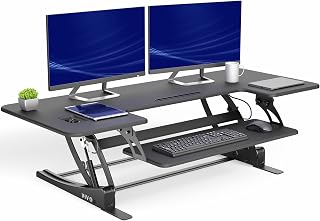
Entry-Level Option
Monoprice Workstream by Monoprice Standing Desk Converter is the budget pick for people testing the waters. It’s stable for light loads, adjusts smoothly, and costs significantly less than premium options. You’re not getting all the bells and whistles, but you get the core function: a working standing desk converter.
Setup and Installation Tips
Most converters arrive partially assembled. You’ll need to attach the worksurface to the base frame—usually a 15–30 minute job with basic tools.
Positioning: Place the converter in the center of your desk so weight distributes evenly. If your desk is narrow, position it toward the back to leave room for a keyboard tray or wrist rest in front.
Cable management: Run monitor and power cables down the back leg or along the side. Slack cables can snag when you raise and lower the converter.
Monitor height: When standing, your monitor should be at eye level, about 20–26 inches away. Most converters let you adjust monitor angle, so take time to dial that in.
Keyboard placement: Keep your keyboard and mouse at elbow height when standing. If the converter’s surface is too high, use a keyboard tray underneath to drop them down.
For a complete setup guide, see How to Set Up a Standing Desk in a Small Home Office.
Pairing Your Converter with Ergonomic Accessories
A budget converter is just the start. To maximize comfort, add a few low-cost accessories:
- Anti-fatigue mat: Reduces leg and foot strain during standing sessions. See Best Anti-Fatigue Mats for Home Office Under $100 for budget options.
- Monitor arm: Frees up desk space and lets you position your monitor precisely. Check Best Monitor Arms Under $100.
- Ergonomic keyboard: Reduces wrist strain during long typing sessions. Best Budget Ergonomic Keyboards Under $80 has affordable picks.
- Wrist rest pad: Minimal cost, meaningful comfort. Affordable Wrist Rest Pads for Keyboard and Mouse covers budget options.
Together, these accessories cost less than a mid-range converter alone but transform your setup from “standing desk” into “ergonomic standing desk.”
Converter vs. Full Standing Desk: When Each Makes Sense
A converter is right for you if: - You rent and can’t modify your current desk. - Your space is tight and a full desk won’t fit. - You want to try standing before investing in a full setup. - Your current desk is solid and you just need the height adjustment.
A full standing desk makes more sense if: - You have permanent office space and plan to keep the desk for years. - You need a large work surface. - You want a seamless, integrated look.
For a detailed comparison, read Affordable Full Standing Desks vs Converters for Renters.
FAQ
How much should I spend on a budget converter? Entry-level converters start in the budget-friendly category and go up to the mid-range tier. You can find functional options at the lower end, but mid-range models offer better stability and motor reliability. Don’t cheap out on the frame or motor; a wobbly or slow converter defeats the purpose.
Can I use a converter on a small desk? Yes. Compact converters are designed for desks 40 inches wide or smaller. Measure your desk depth too—you need at least 18 inches to fit a monitor and keyboard. If your desk is smaller, look for converters with a footprint under 24 inches deep.
Do I need a dual-motor converter? Not necessarily. Dual-motor converters lift more evenly and handle heavier loads, but they cost more. If you’re placing one monitor and a keyboard on the converter, a single-motor model is fine. If you’re stacking two heavy monitors or a monitor arm plus equipment, dual-motor is safer.
How long do budget converters last? A well-made budget converter lasts 3–5 years of regular use. Manual converters last longer because there are fewer moving parts. Electric converters depend on motor quality; cheap motors may fail after 2–3 years. Read reviews mentioning longevity before buying.
Will a converter fit under my desk when lowered? Most converters lower to 4–6 inches above the desk surface, so they won’t fit under a desk with a drawer. Measure the clearance under your desk and compare it to the converter’s minimum height. If you need the converter to disappear, a full standing desk frame is a better choice.
Bottom Line
A budget standing desk converter gives you the sit-stand benefit without the full cost or commitment of a standing desk frame. The best options balance stability, smooth adjustment, and durability at a price that won’t hurt your wallet. Start with a compact, entry-level model to test the habit, then upgrade to a motorized mid-range option if you find yourself alternating positions throughout the day.
Pair your converter with affordable ergonomic accessories—an anti-fatigue mat, monitor arm, and ergonomic keyboard—and you’ll have a genuinely comfortable standing setup for less than a premium desk alone.
For more on building an ergonomic home office on a budget, see Budget Home Office Ergonomics Setup Under $500.


