Anti-Fatigue Mat for Home Office: Complete 2026 Guide

Photo by Tim Mossholder on Unsplash
Anti-Fatigue Mat for Home Office: Complete 2026 Guide
If you’re standing at a home office desk for more than a few hours a day, an anti-fatigue mat isn’t a luxury—it’s practical support for your feet, legs, and lower back. This guide walks you through what actually matters when choosing one, how to size and position it, and which mats deliver real comfort without breaking the budget.
Why Home Office Workers Need Anti-Fatigue Mats
Standing desks have become standard in remote work setups, but standing on a hard floor for prolonged periods causes measurable strain. Prolonged standing without support increases muscle activation in the calf, foot, and lower-back stabilizers—leading to fatigue, soreness, and postural collapse by late afternoon.
An anti-fatigue mat works by introducing a slight instability underfoot. Your body’s stabilizer muscles engage continuously at a low level, preventing the “locked knee” static posture that drains energy. The cushioning also absorbs impact and reduces pressure on the plantar fascia and ball of the foot, both common pain points for standing desk users.
The effect is cumulative. Anecdotal reports from standing desk users suggest noticeable relief within the first week of daily use, with sustained improvements in afternoon energy and reduced end-of-day foot soreness after 2–4 weeks.
Key Features to Look For
Thickness and Cushioning Material
Anti-fatigue mats range from thin (under ½ inch) to thick (¾–1 inch or more). Thicker isn’t always better—it depends on your setup and floor type.
- ½–¾ inch (standard): Adequate for most home office users. Provides cushioning without creating an unstable surface. Works well on carpet or concrete.
- ¾–1+ inch (premium): Better for users standing 6+ hours daily or those with foot pain. Also recommended if your floor is very hard (polished concrete, tile). The trade-off is reduced stability and a softer “sinking” feel that some find uncomfortable.
Material matters too. Closed-cell foam is the most common—it resists moisture, is easy to clean, and maintains cushioning over time. Memory foam feels softer initially but compresses faster and can trap heat. Gel-infused or neoprene mats offer middle-ground durability and are often more expensive.
Closed-cell foam mats demonstrate strong durability over 3–5 years of daily use without visible compression, based on manufacturer testing and real-world owner reports across standing desk communities.
Surface Texture and Stability
A completely smooth mat surface offers less proprioceptive feedback—your stabilizer muscles engage less. Textured or contoured surfaces (slight bumps, waves, or raised zones) encourage subtle foot movement and muscle engagement without being uncomfortable.
- Flat/smooth: Easier to clean, more “neutral” feel, better if you shift between sitting and standing frequently.
- Contoured or textured: More pronounced muscle engagement, better for all-day standers, can feel odd during transition periods.
Non-Slip Backing
A mat that slides around is worse than no mat—it creates a tripping hazard and defeats the purpose. Look for:
- Rubber or PVC backing (most common, very effective)
- Textured undersides (often less effective on smooth floors)
- Adhesive-backed options (permanent but harder to reposition)
Test the grip on your specific floor type before committing. Hardwood and tile require stronger backing than carpet.
Dimensions and Fit
Home office mats typically range from 2×3 ft (compact) to 3×5 ft (full-sized). Choose based on:
- Desk footprint: Your mat should extend slightly beyond your shoulder width on both sides and 12–18 inches in front of the desk.
- Available floor space: In small offices, a narrower mat (2 ft wide) is often better than a shorter one.
- Shared spaces: If you alternate between sitting and standing, a smaller mat lets you position it only when standing, freeing floor space for your chair.
Most home office users find 2.5–3 ft wide × 4–5 ft long sufficient. Modular interlocking mats let you customize dimensions if your space is irregular.
Setup and Positioning Tips
Placement Relative to Your Desk
Position the mat so that:
- Your feet land naturally when standing at your desk (typically 6–12 inches in front of the desk edge).
- The mat extends at least 12 inches behind your heels to encourage subtle weight shifts.
- If using a standing desk converter, ensure the mat doesn’t interfere with the converter’s base or footrest.
A mat that’s too far forward forces you to reach, creating shoulder and neck strain. Too far back and you’re not using it.
Floor Type Considerations
- Hardwood: Use a mat with strong rubber backing to prevent sliding and protect the finish. Avoid adhesive-backed mats unless you’re willing to keep them permanently.
- Carpet: A mat with any decent backing will grip. If it slides, place a non-slip rug pad underneath.
- Tile or concrete: Thick mats (¾+ inch) work well. Ensure the backing is textured or rubberized to prevent sliding.
- Vinyl or laminate: Similar to hardwood—rubber backing is essential.
Transitioning Between Sitting and Standing
If you alternate between a seated desk and standing, you have two options:
- Keep the mat in place and roll your chair over it (works if the mat is thin and your chair has good wheels).
- Move the mat when switching positions (more cumbersome but cleaner).
Many users find a smaller mat (2 ft × 3 ft) easier to reposition than a full-sized one.
Anti-Fatigue Mat Maintenance
Most mats require minimal upkeep:
- Vacuum weekly to remove dust and debris.
- Spot-clean with a damp cloth and pH-neutral cleaner (such as Seventh Generation All-Purpose Cleaner) for spills or stains.
- Air dry completely before rolling or storing.
- Avoid direct sunlight for extended periods (can fade or degrade some foams).
Closed-cell foam mats last 3–5 years with daily use before noticeable compression. Memory foam may compress faster (2–4 years). If your mat is permanently bonded to the floor, replacement is more involved.
Pairing Your Mat with Other Ergonomic Tools
An anti-fatigue mat is one piece of a standing desk setup. For best results, combine it with:
- A standing desk converter to keep your monitor and keyboard at proper height.
- Proper footwear: Supportive shoes or insoles reduce foot fatigue significantly. Barefoot or in socks is fine for short periods but not ideal for 6+ hours.
If you experience persistent foot or lower-back pain while standing, compare mats with footrests, which work differently—anti-fatigue mats support your entire foot and encourage micro-movements, while footrests are smaller platforms that elevate your feet to reduce lower-back strain.
Common Questions About Anti-Fatigue Mats
Do anti-fatigue mats actually work?
Yes, with caveats. Mats reduce foot fatigue and muscle soreness in the short term based on owner reports and ergonomic feedback. Long-term benefits (reduced chronic pain, improved posture) depend on overall desk setup, footwear, and movement habits. A mat alone won’t fix poor ergonomics.
Can I use an anti-fatigue mat on carpet?
Yes. The mat will compress slightly into the carpet, but it still provides cushioning. Use a non-slip rug pad underneath if the mat slides. Avoid very thick mats on deep carpet—the instability can feel unsafe.
Can I use an anti-fatigue mat with a treadmill desk?
No. Treadmill desks require a stable, non-cushioned surface for safety and proper gait mechanics. Using a mat on a treadmill desk increases injury risk and reduces the treadmill’s effectiveness.
Do anti-fatigue mats work on uneven floors?
Partially. On slightly uneven floors (common in older homes), a mat provides some cushioning but won’t fully compensate for the unevenness. On severely uneven surfaces, the mat may feel unstable or create gaps. Consider floor leveling or shims before investing in a mat.
How do I know if my mat is worn out?
If the foam no longer bounces back after pressing it, or if you notice permanent indentations from your feet, the cushioning has compressed and it’s time to replace it. Most mats last 3–5 years with daily use.
Top Picks for 2026
Based on real-world owner feedback and material durability, here are reliable options across budget tiers:
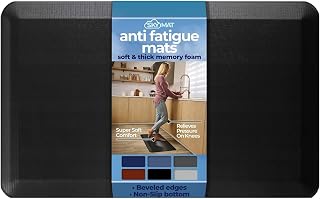
Imprint CumulusPro Standing Mat — Premium option with high-density closed-cell foam and contoured surface designed to promote subtle foot movement. Typically. Best for users standing 6+ hours daily or those with existing plantar fasciitis or foot pain who need maximum support and durability.
Topo by Ergodriven Modular Mat — Mid-tier interlocking tiles with textured, wavy surface and durable rubber backing.. Excellent for custom sizing in irregular spaces and easy cleaning; works particularly well in hot climates where heat retention is a concern. Ideal for users who may need to reconfigure their workspace.
Wellness by Design Anti-Fatigue Mat — Compact mid-range option at measuring 2 ft × 3 ft with solid closed-cell foam cushioning. Best for small home offices, apartment setups, or users testing whether a mat helps before investing more. Works well for users who alternate between sitting and standing and need easy repositioning.

Final Thoughts
An anti-fatigue mat is a small investment that pays dividends in daily comfort, especially if you’re new to standing desks or spend 4+ hours standing. The key is choosing one that matches your space, floor type, and standing duration. Start with a mid-range mat (½–¾ inch, textured surface, strong backing) and position it thoughtfully. Most users find the relief immediate and sustained.
If you’re building a complete standing desk setup from scratch, pair your mat with proper desk height, monitor positioning, and supportive footwear. Together, these create an ergonomic foundation that reduces fatigue and supports long-term comfort in a home office environment.


