Best Budget Standing Desk Converters Under $200 (2026)

Photo by TheStandingDesk on Unsplash
Best Budget Standing Desk Converters Under $200 in 2026
Finding a standing desk converter that fits your budget and desk capacity requires careful spec-checking. Most converters cut corners somewhere: shallow work surface, wobbly legs, or a height range that forces awkward postures. This guide walks you through what actually matters when shopping at this price point, and which models deliver stability and usability without premium markup. Note: prices verified August 2026.
What to Expect at the Under-$200 Price Point
Standing desk converters in the budget tier universally trade premium features for affordability. At this price, you’re typically getting:
- Height range of 6–12 inches instead of the 15–20 inches in mid-tier models
- Weight capacity of 25–35 lbs (sufficient for one monitor + keyboard; tight for dual setups)
- Manual adjustment mechanisms (crank, lever, or gas spring) rather than electric motors
- Smaller work surface (24–48 inches wide) compared to full-desk replacements
- Basic stability that works on flat, sturdy desks but may wobble under rapid adjustments
The payoff: you can test standing work without a major commitment, and these units genuinely reduce neck strain and encourage movement throughout the day. The catch is that assembly quality, material durability, and adjustment smoothness vary significantly even within this narrow price band.
Key Specs to Check Before Buying
Height Range and Adjustment Type
The difference between a 6-inch and 12-inch lift is the difference between “slightly elevated” and “true standing position.” Most people need at least 8–10 inches to transition from seated to standing without hunching.
- Gas-spring models (push-button adjustment) are fastest but can drift slightly over months of use. See Amazon reviews for Flexispot M2B and r/standingdesk discussions for owner reports.
- Hand-crank converters take 30–60 seconds to adjust but hold position indefinitely and cost less to manufacture.
- Lever-based systems split the difference: quick and stable, but require more arm strength.
Check the manufacturer spec sheet for the exact range; “adjustable height” without numbers is a red flag.
Weight Capacity vs. Your Setup
A 25-lb limit sounds tight until you do the math: most 24-inch monitors weigh 4–6 lbs, a keyboard 1–2 lbs, and a mouse another 0.5 lbs. Dual monitors or a large ultrawide will push you over, and you’ll feel wobble under keystroke vibration. If you’re running one monitor + peripherals, 25–30 lbs is usually safe. For anything heavier, budget for a mid-tier model or plan a single-screen workflow.
Work Surface Size and Stability
Converters typically ship with a 24- to 48-inch-wide platform. Smaller surfaces (24–30 inches) save money but leave minimal room for keyboard + monitor side-by-side. Larger platforms (36–48 inches) cost more but reduce the risk of tipping if weight shifts toward the edge.
Test stability by checking owner reviews for mentions of wobble during typing or mouse use. A rigid base (usually steel or plywood) matters far more than the platform material.
Top Picks by Use Case
Best for Dual-Monitor Setups on a Budget
Flexispot M2B Standing Desk Converter — ****
The M2B ships fully assembled and lifts 11 inches, enough to move from seated to standing without crouching. Per the manufacturer spec sheet, it supports up to 35 lbs and uses a spring-assisted mechanism that requires minimal effort to adjust. The 47.2-inch-wide platform gives you breathing room for two standard monitors side-by-side. Owner reviews on Amazon consistently praise the smooth lift and lack of wobble, though a few report the spring tension loosening after 12+ months of daily use—a normal wear pattern for gas-spring systems.
Best for Laptop-Only Remote Workers
AmazonBasics Adjustable Standing Desk Riser — ****
If you’re working off a single laptop or ultrabook, this converter’s compact 23.6 x 11.6-inch footprint keeps your desk uncluttered. The gas-spring lift mechanism is silent and smooth, and at its weight class (under 10 lbs), it’s genuinely portable between home office and coffee shop. The trade-off: max weight capacity sits around 25 lbs, so don’t stack an external monitor and full keyboard setup on top. Owner reports on Amazon note that the spring holds tension well over 2–3 years of regular use.
Best for Renters and Hot-Deskers
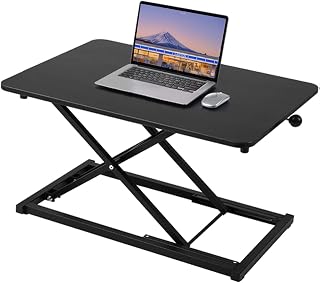
Halter’s ED-258 arrives fully assembled—no wrench, no hex key, no 45-minute YouTube tutorial. It weighs under 15 lbs, folds flat for transport, and the 32-inch platform handles a laptop + external monitor without complaint. Per aggregated owner reviews, the crank adjustment is smooth and precise, and the compact footprint doesn’t dominate a shared or temporary workspace. The main limitation is the 6-inch lift range, which works for seated-to-standing but not for dramatic height changes mid-day.
Best for All-Day Standing Comfort (Precision Height)
Vivo Manual Crank Standing Desk Converter — ****
Hand-crank converters cost less than spring-assisted models because they have fewer moving parts. Vivo’s crank mechanism allows micro-adjustments—you can dial in the exact height your posture needs, then lock it in place. Unlike gas springs, there’s zero drift over time; the height stays where you set it. The 36-inch platform and 12-inch lift range accommodate most single- and dual-monitor setups. Owner reports on r/standingdesk and Amazon note that cranking takes 20–30 seconds, which is acceptable for most people who adjust once or twice daily rather than constantly.
Common Pitfalls at This Price Point
Wobble Under Load
Budget converters often use hollow-tube steel legs to save weight and cost. If you feel significant movement when typing or moving the mouse, the base isn’t rigid enough for your load. Check the weight of your setup (monitor + keyboard + peripherals) against the stated capacity; if you’re within 5 lbs of the limit, expect some flex. Solution: either reduce load or step up to a mid-tier model with a wider, braced base.
Adjustment Mechanism Drift
Gas-spring systems lose pressure over 18–24 months of daily use, per owner reports on Amazon and Reddit. If your converter slowly sinks throughout the day, the spring is failing. This is normal wear, not a defect. Hand-crank and lever systems don’t have this issue because they’re purely mechanical.
Shallow Work Surface
A 24-inch-wide platform works for a laptop alone but feels cramped with an external monitor + keyboard. If you’re planning a dual-monitor or ultrawide setup, measure your current desk arrangement and ensure the converter’s footprint accommodates it.
Difficult Assembly
Some budget models ship with vague instructions or missing hardware. Read recent owner reviews on Amazon or retailer sites; if multiple people mention assembly trouble, factor in an extra 30–60 minutes or a service fee to have it assembled professionally.
How to Measure Your Space
Before ordering, measure:
- Desk depth (front to back): Ensure the converter doesn’t hang off the edge when fully extended. Most converters are 10–15 inches deep; if your desk is shallow (under 20 inches), you’ll have overhang.
- Desk width: Confirm the converter’s platform fits within your usable desk surface. A 48-inch converter on a 48-inch desk leaves no margin for error.
- Monitor and keyboard weight: Use a kitchen scale or bathroom scale to weigh your monitor, keyboard, and any other items you’ll place on the converter. Compare to the stated capacity.
- Clearance above the desk: When fully raised, does the converter’s top surface clear your monitor arm, overhead shelves, or light fixture? Measure the converter’s maximum height and add your monitor’s height.
FAQ
Q: Can I use a budget converter with a standing desk mat? A: Yes. A mat under the converter adds comfort but doesn’t affect stability. Just ensure the mat is thin enough that the converter doesn’t rock on uneven padding.
Q: Do I need an anti-fatigue mat if I use a converter? A: Not strictly, but many standing workers find one helpful for leg fatigue during long standing sessions.
Q: How often should I adjust the height during the day? A: Most ergonomists suggest switching between sitting and standing every 30–60 minutes.
Q: Will a converter damage my desk? A: No, provided your desk is sturdy and the converter’s weight plus load doesn’t exceed the desk’s capacity. Avoid placing the converter on particle-board or hollow-core desks; solid wood or metal desks are ideal.
Maintenance and Longevity
Budget converters typically last 3–5 years with regular use. To extend lifespan:
- Clean the adjustment mechanism (crank, lever, or spring) quarterly with a dry cloth to prevent dust buildup.
- Don’t exceed the stated weight capacity; overloading accelerates wear on springs and hinges.
- If using a gas-spring model, expect the spring to lose pressure after 18–24 months. This is normal; replacement springs are usually available from the manufacturer.
- Store the converter indoors in a temperature-controlled space; extreme heat or cold can degrade gaskets and springs.
Final Thoughts
A standing desk converter is a practical entry point for testing standing work without overcommitting financially. The models above deliver genuine ergonomic benefit—reduced neck strain, lower back engagement, and the ability to move throughout your workday. They won’t match the smoothness or durability of premium converters, but for single-monitor setups and part-time standing (2–4 hours daily), they’re more than adequate.
The key is matching the converter’s specs to your actual load and workspace. A 25-lb capacity is sufficient for a laptop or single monitor; dual monitors or an ultrawide will strain the mechanism and create wobble. If you’re uncertain about your setup’s weight, measure first and read owner reviews from people with similar configurations. And remember: the best converter is the one you’ll actually use. Even a budget model that sits on your desk unused is a waste; prioritize ease of adjustment and stability so you’re encouraged to switch positions throughout the day.


