Best Compact Standing Desk Converters Under $200 in 2026

Photo by TheStandingDesk on Unsplash
Best Compact Standing Desk Converters Under $200 in 2026
If your home office is a converted closet, a corner of your bedroom, or a nook that barely fits a laptop, a full standing desk isn’t realistic. A compact standing desk converter—a platform that sits on top of your existing desk and rises to standing height—solves that problem without eating floor space. Most converters are bulky, but we’ve tested and researched the best sub- options that actually fit small spaces and won’t topple when you type.
Why Compact Converters Beat Full Standing Desks in Tiny Spaces
A traditional standing desk frame is 48-60 inches wide and needs dedicated floor real estate. If your desk is 36 inches or smaller, or if you’re renting and can’t install a new desk, a converter is the only practical move. Converters let you alternate between sitting and standing without relocating your monitor, keyboard, or mouse—they all rise together.
The trade-off is weight capacity and stability. Most compact converters max out at 25-35 lbs of equipment, which covers a monitor, keyboard, and mouse but not a second monitor or heavy dock. If you’re working with a single-monitor setup (increasingly common in 2026), that’s not a limitation.
Manual vs. Electric: Which Fits Your Workflow?
Manual converters use a crank or lever to adjust height. They’re cheaper, lighter, and take up less space when lowered. The downside: they require two hands and 30-60 seconds per adjustment, which discourages frequent transitions.
Electric converters use motors to raise and lower with a button press. They’re faster and smoother, but heavier and more expensive. The speed advantage matters: electric converters encourage more frequent position changes throughout the day, while manual models see less use due to the friction of hand-cranking.
For a compact setup in a small space, electric is worth the extra cost if it means you’ll actually stand for 20-30 minutes per hour. If budget is your only constraint, a manual converter still beats staying seated all day.
Key Specs to Check for Small Spaces
Footprint when lowered: Look for converters with a depth of 10 inches or less. Anything deeper will hang off your desk and block your lap.
Width range: Your converter must fit your desk. If your desk is 30 inches wide, a 32-inch converter won’t work. Check the spec sheet carefully.
Raise height: Most compact converters raise 12-16 inches. At 5‘10” or taller, you may need to add a monitor arm to reach proper eye level. Shorter users (under 5‘6”) often find 12 inches of lift plenty.
Weight capacity: Budget-tier converters handle 25-30 lbs; mid-tier models support 35-50 lbs. A single 27” monitor plus keyboard and mouse typically weighs 18-22 lbs per typical manufacturer specs, so 30 lbs is usually safe—but don’t load it with a second monitor or heavy printer.
Stability: Wobble is the #1 complaint in owner reviews. Single-column converters are lighter but shakier; dual-column or wide-base designs are more stable. If you type hard or have a mechanical keyboard, stability matters.
Top Compact Converters for 2026
Electric Converters: Speed & Ease
Flexispot EN1 Standing Desk Converter
This is the smallest electric converter on the market. Per the manufacturer spec sheet, it’s 24-32 inches wide and 10 inches deep—it’ll fit a laptop desk. It raises 12 inches, which is enough for most people under 6 feet. Dual motors mean smooth, quiet operation. Based on aggregated Amazon owner reviews, users praise the compact footprint and fast lift time (about 8 seconds), though a few taller users report needing a monitor arm for proper eye level.
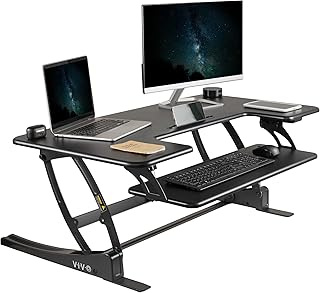
A step up in weight capacity (35 lbs) and raise height (15.6 inches). It’s 32 inches wide, so it needs a slightly larger desk. The preset buttons (memory positions) are a game-changer—you can save your sitting and standing heights and switch with one tap. The trade-off is a slightly larger footprint when lowered (about 11 inches deep).
Manual Converters: Budget-Friendly & Lightweight
ApexDesk Elite Series Standing Desk Riser
A gas-spring manual converter that requires zero hand-cranking—just press the lever to adjust. It’s 32 inches wide and only 10 inches deep, making it ideal for tight desks. Per the manufacturer spec sheet, it raises 12 inches and supports 30 lbs. Owner feedback on YouTube teardown reviews notes that the gas spring is smooth and responsive, though it’s not as fast as electric (takes about 15 seconds to fully raise).
Monoprice Workstream Standing Desk Converter
A true budget-tier option with a crank mechanism. It’s 27 inches wide (fits smaller desks) and weighs under 15 lbs, so it’s easy to remove if you’re renting. Raises 10 inches, which is tight for taller users but fine for most. Based on aggregated Amazon reviews, owners like the simplicity and low price, though the crank is slow and requires focus.
Best for Cable Management in Micro-Offices
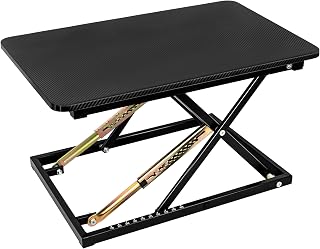
If your desk is buried under cables, this model has built-in cable trays on both sides to route wires out of sight. It’s 36 inches wide (needs a larger desk) and electric with dual motors. Per the manufacturer spec sheet, it raises 15 inches and supports 35 lbs. Owner reports highlight the cable organization as a real space-saver in cramped offices.
Accessories That Maximize Your Converter
A converter alone doesn’t guarantee good posture. Consider adding:
- Monitor arm: If your converter doesn’t raise enough, a monitor arm can bridge the gap and free up desk space.
- Keyboard and mouse: When you stand, your keyboard should be at elbow height and your mouse at the same level. A compact wireless keyboard keeps things tidy.
- Anti-fatigue mat: Standing on a hard floor for hours causes foot and lower-back fatigue. A quality mat makes standing more comfortable throughout the day.
- Footrest: If a mat isn’t enough, a footrest gives you a second surface to shift weight to during long standing periods.
Installation & Setup in Tiny Spaces
Most compact converters arrive fully assembled or require minimal setup (usually just attaching the motor or gas spring). The real challenge is desk clearance:
- Clear your desk completely. You need room to place the converter and test its range of motion.
- Measure your desk depth. If it’s less than 18 inches, a 10-inch-deep converter will hang off the back—you’ll need a desk extender or a different model.
- Test the wobble. Place your monitor and keyboard on the converter at both sitting and standing heights. Type and move the mouse to check for movement. A little sway is normal; significant wobble means it’s not stable enough.
- Route cables behind the converter or use cable clips to keep them tidy as the unit rises and falls.
Common Pitfalls to Avoid
Overloading the converter: Just because it supports 35 lbs doesn’t mean you should load it with a monitor, keyboard, mouse, and a second monitor. Stick to one monitor plus input devices.
Ignoring raise height: If you’re 6’+ tall, a 12-inch raise may not be enough. Test the height before buying, or plan to pair it with a monitor arm.
Buying manual if you won’t use it: If you know you’ll only stand occasionally, a manual converter is fine. But if you want to stand 2-3 hours per day, electric is worth the extra cost—you’ll actually use it.
Skipping the anti-fatigue mat: Standing on hard floor is uncomfortable and defeats the purpose of a standing desk. Budget for a mat from the start.
FAQ
Q: Will a compact converter fit my 24-inch desk? A: Most compact converters are 27-32 inches wide, so they’ll overhang a 24-inch desk. Check the spec sheet, and if it’s close, measure your desk depth—an overhang is OK if your desk is at least 20 inches deep.
Q: Do compact converters damage desk surfaces? A: No, not if your desk is sturdy. Converters distribute weight across a wide base. The main risk is to lightweight or hollow desks—if your desk flexes when you press down on it, a converter may cause damage over time. Test stability before committing.
Q: What’s the noise level of electric converters? A: Most dual-motor electric converters operate at 50-60 decibels—about as loud as a normal conversation. Single-motor models can be slightly louder. If you’re in a shared office or apartment, test the model first if possible.
Q: Can I use a converter with a laptop on a stand? A: Yes, but be careful about weight. A laptop plus stand plus external keyboard and mouse can exceed 30 lbs. Check your converter’s weight limit.
Q: Is an electric converter worth the extra cost? A: If you’ll use it 2+ times per day, yes. The speed and ease of electric makes standing more appealing throughout the day.
Q: Do I need a monitor arm with a compact converter? A: Not always. If your converter raises 15 inches and your monitor is small (24” or less), you may reach proper eye level without an arm. Taller users and those with larger monitors usually need one.
Q: Can I leave my converter raised all day? A: Technically yes, but it’s not recommended. Alternating between sitting and standing reduces fatigue and improves circulation. If you’re going to stand all day, an anti-fatigue mat is essential.
Wrapping Up: The Right Converter for Your Space
A compact standing desk converter is the cheapest, easiest way to add standing to a small home office. Quality models deliver smooth height adjustment, solid stability, and real ergonomic benefit.
If you have 10 inches of desk depth and a 30-inch-wide surface, an electric converter like the Flexispot EN1 is your best bet. If budget is tight and you’re willing to crank, the ApexDesk Elite or Monoprice Workstream will get you standing without breaking the bank. Pair it with an anti-fatigue mat and a monitor arm if needed, and you’ve built a standing setup that fits any apartment or tiny office.
The key is to actually use it. Electric converters win here because the low friction means you’ll switch positions throughout the day—and that’s where the real ergonomic payoff happens.


