As an affiliate, we may earn from qualifying purchases. This doesn't affect which products we recommend.
The Best Split Keyboards for Wrist Pain (Without Going Broke)
If typing all day leaves your wrists aching, pronated, or tingling, a split keyboard is one of the few hardware fixes with a solid mechanical rationale: it lets your forearms sit at shoulder width instead of squeezing inward, and (with tenting) lets your palms rotate toward neutral. Below are the models actually worth buying at a few different budgets, with honest notes on what each one does and doesn’t solve.
Why a split keyboard helps wrist pain in the first place
A standard keyboard forces two compromises on most adults:
Ulnar deviation — your wrists bend outward toward your pinkies because the keyboard is narrower than your shoulders.
Forearm pronation — your palms face fully down, which twists the radius and ulna across each other and loads the soft tissue on the pinky side of the wrist.
A split keyboard lets you pull the halves apart so your wrists stay straight, and a tented split keyboard lifts the inner edges so your palms rotate toward a handshake position. Per occupational therapy guidance commonly cited in ergonomic assessments, these two changes target the two most common posture-related contributors to wrist and forearm pain from typing.
It won’t fix everything. If your desk is too high, your chair is too low, or you rest your wrist bones on a hard edge for eight hours, a new keyboard is a band-aid. Pair the keyboard change with the rest of your setup — Budget Ergonomic Home Office Setup Under $500: Complete Guide walks through that in order.
What actually matters when choosing one
Most reviews fixate on switch type and RGB. For wrist pain, these are the features that actually matter:
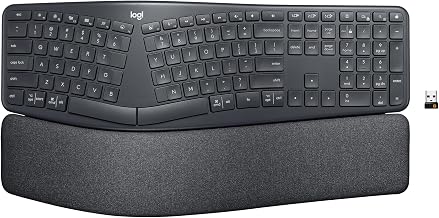
True separation vs. fixed split. A “fixed split” (like the Logitech Ergo K860) is one piece with a gap in the middle — easier to live with, but you can’t adjust the distance. A “true split” (Freestyle2, Moonlander, Keychron Q11) lets each half sit wherever your shoulders want it. True splits help more with ulnar deviation.
Tenting. Lifting the inner edges 10-20° is where a lot of people find real pronation relief. Some boards have it built in, some sell it as an accessory, and some don’t support it at all.
Negative tilt. Your wrists should not bend upward toward the keys. Look for a flat or slightly negative slope — the opposite of those plastic flip-out feet on cheap keyboards.
Palm support vs. wrist rest. You want to rest the base of your palm, not the wrist itself. A soft pad at the correct height under the palm heel is fine; a hard edge under the wrist bones is not. More on this in Ergonomic Keyboard Wrist Rest: Do They Actually Help?.
Switch actuation force. Heavy switches (60g+) aggravate finger flexors for some people. A 2019 study in Applied Ergonomics (Kim et al., “Effects of keyboard key force on typing performance and discomfort”) found that lower actuation force reduced forearm muscle activity and self-reported discomfort during sustained typing — supporting lighter linears (around 45g) or tactiles in that range for long sessions.
This is the keyboard I recommend to anyone who’s never used a split before and just wants to stop hurting by next week. It’s a single-piece fixed split with a built-in curved palm rest and — critically — a negative tilt kickstand at the back, so the keyboard slopes away from you rather than up at you. Per Logitech’s spec sheet, it’s a scissor-switch membrane, not mechanical, which some people love (quiet, low force) and some people don’t (mushy).
Who it’s for: office workers, writers, and anyone who doesn’t want to relearn their typing posture. You can put it on your desk and use it the same afternoon.
Who should skip it: programmers who want remappable keys, and anyone whose shoulders are wider than the fixed gap allows.
Two halves, connected by a cable, that you can slide as far apart as your shoulders want. It comes in a short-cable version and a longer-cable version (per the manufacturer spec sheet, roughly 9 inches vs. 20 inches). The longer one is what you want if wrist pain is the whole reason you’re buying it, because you’ll almost certainly end up pulling the halves farther apart than you expect.
It’s a membrane keyboard, which surprises people, but based on aggregated owner reviews this is actually part of why it’s gentle: low actuation force, short travel, nothing to bottom out on. Add-on accessories let you add tenting and palm pads later.
Who it’s for: office typists whose pain is mostly ulnar (pinky-side), and anyone who’s tried a fixed split and felt it wasn’t enough.
The Moonlander is expensive (solidly in the premium tier) and it has a learning curve, but if you’ve already tried cheaper splits and still hurt, this is the tier where the real ergonomic features live: true tenting up to around 45° via built-in legs, thumb clusters so your pinkies stop doing so much work, column-stagger layout so fingers move straight up and down instead of diagonally, and full per-key remapping via ZSA’s Oryx configurator.
ZSA’s own onboarding documentation (“Getting started with your Moonlander,” zsa.io/moonlander/train) tells new users to expect two to four weeks before typing speed returns to baseline, and recommends gradual daily practice rather than full-time switching on day one. Once speed recovers, the reduction in pinky and thumb strain is the feature owners mention most often.
Who it’s for: programmers, heavy typists, and anyone whose wrist pain has a stubborn thumb or pinky component a regular split hasn’t fixed.
Keychron’s split is a 75% layout, meaning it keeps function keys and arrows but loses the numpad and some navigation cluster. The halves connect via a cable and sit reasonably flat. It’s mechanical (hot-swappable switches, per the spec sheet), it’s heavy aluminum, and it doesn’t have built-in tenting — you can prop the inner edges with something, but it’s not a tenting feature.
Who it’s for: people with smaller desks, people who want mechanical feel without going full custom, and anyone who travels between a home and office setup.
Who should skip it: people who need aggressive tenting out of the box.
This is a fixed-split membrane keyboard with a built-in palm rest and a standard layout. It won’t transform your typing life — there’s no tenting, no remapping, and the build quality is what you’d expect in the budget tier — but for occasional users or a second computer, it’s a legitimate way to get wrist-straightening benefits without spending premium money.
Who it’s for: light typists, students, people testing whether a split layout helps them before committing, and secondary workstations.
What a split keyboard won’t fix
Be realistic. A split changes the angle of your wrists while typing. It does nothing for these, which frequently turn out to be the real drivers of pain:
Mouse posture. If you death-grip a standard mouse for eight hours, your forearm still pronates and your wrist still deviates — the keyboard half of your day got better, the mouse half didn’t.
Chair and desk height mismatch. If your elbows sit below the desk surface, you’ll reach up into the keyboard regardless of its shape, re-introducing wrist extension.
Monitor height. A low monitor pulls your head and shoulders forward, which loads the same forearm and wrist tissues through referred tension from the upper trap and shoulder.
Sheer typing volume. No keyboard compensates for ten hours of uninterrupted typing. Micro-breaks every 20–30 minutes matter more than hardware.
If you’re in real pain, the keyboard is one change in a stack of changes — see the full-setup guide linked above.
Setup tips that make any of these work better
Pull the halves farther apart than feels natural at first. Kinesis’s Freestyle2 setup guidance recommends positioning each half so your forearms are roughly in line with your shoulders — for most adults that’s 6–9 inches of separation between the inner edges, well beyond where a single-piece keyboard would sit.
Get the keyboard below elbow height, not at it. Your wrists should be flat or angled slightly downward, never up. A keyboard tray or a lower desk helps more than any keyboard feature.
Rest the palm heel, not the wrist. If you feel a hard edge pressing on the soft underside of your wrist, move the keyboard or the rest.
Take the first two weeks slow. If you’re switching from a regular layout, your speed will drop. Don’t power through pain; build back up.
Reconsider switch weight. If your fingers are sore at the end of the day, lighter switches (or a membrane) may serve you better than heavy tactiles — see the switch-force research cited above.
FAQ
Do I need a mechanical split keyboard, or is membrane fine?
Membrane is fine, and for some people it’s actively better because the actuation force is lower. The Logitech Ergo K860 and Kinesis Freestyle2 are both membrane and are among the most-recommended ergonomic keyboards on the market.
How long does it take to adjust to a split keyboard?
A fixed split (like the K860) typically takes a few days because the key layout is unchanged. A true split at shoulder width takes one to two weeks, per Kinesis’s Freestyle2 user documentation. A column-staggered board like the Moonlander takes two to four weeks to return to baseline typing speed, per ZSA’s own onboarding guidance (zsa.io/moonlander/train).
Will a split keyboard fix carpal tunnel syndrome?
No single piece of hardware fixes CTS, and you should see a clinician if you have numbness or weakness. A split keyboard reduces two known contributing factors (ulnar deviation and pronation), which can ease symptoms, but it’s not a medical treatment.
Is tenting worth paying extra for?
If your pain is on the thumb side of your wrist or in your forearms, yes. If your pain is mostly on the pinky side, pulling the halves apart matters more than tenting. Many people end up wanting both eventually.
Can I just use a wrist rest with my regular keyboard instead?
Sometimes, for mild symptoms. A wrist rest addresses a different problem — cushioning your palms between bursts of typing — and does nothing about ulnar deviation or forearm pronation, which are the two postures a split keyboard actually corrects. If your pain is limited to a hard desk edge pressing on your wrists, a rest may be enough. If your wrists bend outward toward your pinkies or your palms feel twisted, no amount of padding will fix the underlying angle, and a split is the right tool.