Dual Monitor Arm on a Budget: Top Picks Under $150

Photo by Josh Sorenson on Unsplash
Dual Monitor Arm on a Budget: Top Picks Under $150
Getting two monitors off your desk surface is one of the smartest ergonomic moves you can make—but a proper dual monitor arm doesn’t have to cost as much as the screens themselves. In 2026, budget-tier dual monitor arms have matured enough that you’re not sacrificing stability or adjustability for the price. This guide walks you through what separates a solid budget arm from a wobbly waste of money, then names four specific models that owners consistently report as reliable workhorses.
Why a Dual Monitor Arm Beats Stacking Monitors
Stacking one monitor on top of the other saves desk space, but it forces your neck into an awkward angle all day. A proper dual monitor arm—whether side-by-side or vertically arranged—lets you position each screen at eye level and arm’s length, which Monitor Arm vs Monitor Stand: Which Saves Space? explores in depth.
The ergonomic payoff is real: your shoulders stay neutral, your neck doesn’t crane upward, and you can actually swivel to face either monitor without twisting your torso. Even budget arms deliver this benefit, as long as they’re built from actual metal and not hollow plastic.
What to Look for in a Budget Dual Monitor Arm
VESA Compatibility Is Non-Negotiable
Every monitor arm worth buying uses VESA mounting holes—a standard 75×75 mm or 100×100 mm grid on the back of your monitor. Before you buy, check your monitor’s manual or the back panel to confirm it has VESA holes. If it doesn’t, the arm won’t work. VESA Mount Monitor Arm Compatibility: What You Need to Know covers this in full detail.
Weight Capacity and Actual Rigidity
Budget arms often list weight limits (e.g., “up to 26 lbs per arm”), but the real test is whether the arm sags or wobbles under real use. According to aggregated owner reviews on Amazon and Reddit’s r/battlestations, arms with reinforced steel joints and dual-pivot designs hold up better than thin aluminum tubes. The Loctek D5D and Huanuo models use steel construction at key joints, while lower-tier budget alternatives often rely on aluminum tubes throughout, which flex more under load. Look for arms where reviewers explicitly mention “no sag” or “rock-solid” after months of daily use, not just on day one.
Gas Spring vs. Fixed Tilt
Gas-spring arms let you adjust height and angle smoothly—you push the monitor up or down and it stays where you leave it. This costs a bit more but gives you flexibility if you swap between sitting and standing or just want to fine-tune your view angle.
Fixed-tilt arms lock the monitors in place once installed. They’re cheaper and simpler, but you can’t adjust height without tools. For a budget setup, gas springs are worth the extra because you’ll use that adjustment feature constantly.
Clamp vs. Grommet vs. Pole Mount
- C-clamp or desk clamp: Bolts to your desk edge. No drilling required; easy for renters. Takes up a bit of desk footprint.
- Grommet (through-hole mount): Slides through a hole in your desk. Requires drilling or an existing hole. Saves clamp space.
- Pole mount: Stands on the desk like a monitor stand. Bulkier but works on any surface.
For a small desk, a clamp saves the most space once installed. For a rented apartment, clamp is your only option.
Top Budget Dual Monitor Arm Picks for 2026
Huanuo Dual Monitor Arm
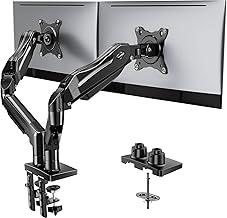
The Huanuo arm is the most commonly recommended budget dual-monitor solution across Reddit and Amazon. It supports 17–27” monitors (up to 14 lbs each, per the spec sheet) with a gas-spring design that feels smooth in practice. Owners report that the arm holds position reliably after months of daily adjustments, and the C-clamp mount is straightforward—no drilling needed. The footprint is approximately 10” deep.
The main trade-off: it’s not ideal for 32” ultrawide or very heavy 4K monitors. If your screens are standard 24” 1080p or 27” 1440p panels, this arm will handle them without issue.
Loctek D5D Dual Monitor Arm
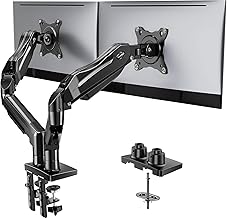
Loctek is a brand known for industrial-grade monitor arms, and the D5D brings that engineering to the budget tier. It’s rated for up to 26.4 lbs per arm (significantly higher than most budget competitors), making it one of the few sub- options that can handle heavy 4K 27” or 32” monitors without visible sag. The joint construction uses reinforced steel rather than thin aluminum, confirmed by owner teardowns and detailed product specifications. The arm footprint is approximately 12” deep.
Setup takes longer than plug-and-play arms—you’ll spend 20–30 minutes with the included hex wrench—but the rigidity payoff is worth it if you’re mounting expensive or heavy screens.
Fleximounts M08 Dual Monitor Arm
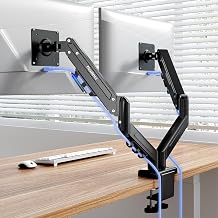
The Fleximounts M08 is the best choice for renters or anyone who can’t (or won’t) clamp to a desk. It uses a C-clamp design that’s rock-solid once tightened, and the quick-release mechanism means you can swap it between desks in under a minute. Supports monitors up to 27” and 14 lbs each. The footprint is approximately 10” deep.
Owner feedback emphasizes the smooth gas-spring action and the fact that the arm doesn’t leave desk marks even after long-term use. The trade-off is that the clamp itself takes up a bit of desk edge real estate, so it’s best suited for desks wider than 48”.
HUANUO Single Gas Spring Dual Monitor Arm (Vertical Stack)
HUANUO Single Gas Spring Dual Monitor Arm
If your desk is narrower than 48” or you simply prefer a vertical layout, this single-arm design stacks one monitor above the other on a single pole. It saves horizontal space and still gives you independent height and tilt adjustment for each screen. The footprint is approximately 8” deep.
Per owner reports, the vertical arrangement works best if you have a higher desk (at least 30” tall) so the top monitor doesn’t force you to look up. It’s also a good option if you want to keep one screen as a reference (e.g., Slack, email) and position the other at eye level for your main work.
Installation and Desk Compatibility
Most budget dual-monitor arms arrive with all hardware included—C-clamp, VESA adapters, hex wrench, and cable ties. Installation typically takes 15–45 minutes depending on the model. You’ll need:
- A desk at least 1.5” thick (for C-clamp models) or an existing grommet hole (for through-mount models).
- Enough desk space to accommodate the arm’s footprint (Huanuo and Fleximounts: ~10” deep; Loctek D5D: ~12” deep; vertical stack: ~8” deep).
- A Phillips or hex screwdriver (usually included).
For smaller desks, How to Install a Monitor Arm on a Small Desk covers space-saving placement strategies in detail.
Common Pitfalls to Avoid
Buying an arm that’s too light-duty. Check owner photos in reviews—if the monitors look visibly sagged or tilted, the arm isn’t rigid enough for daily use.
Ignoring VESA compatibility. If your monitor doesn’t have VESA holes, you’ll need an adapter plate (usually extra), or you’ll waste money on an arm you can’t use.
Choosing a pole mount for a small desk. Pole-mount arms look sleek but take up 6–8” of depth. On a desk smaller than 48” deep, a C-clamp arm saves more usable space.
Over-tightening the clamp. Sounds obvious, but over-tightening can crack your desk edge or strip the clamp threads. Tighten until snug, then stop—the arm won’t fall if you don’t yank on it.
Pairing Your Dual Arm with Other Budget Ergonomics
A dual monitor arm is a great start, but it’s one piece of an ergonomic setup. If you’re building a complete budget home office, consider pairing your arm with:
- A keyboard and mouse positioned at elbow height (your arms should form a 90° angle at the desk).
- A chair that supports your lower back and lets your feet rest flat on the floor.
- Complete Budget Home Office Ergonomics Setup Under $500 walks through a full setup from desk to peripherals.
FAQ
Do I need a dual monitor arm or can I use two single arms? Two single arms work, but a dedicated dual-monitor arm is more stable and usually cheaper.
Can a budget dual monitor arm handle a 32” monitor? Most budget arms max out at 27” safely per manufacturer specs. For 32” screens, you’ll need a mid-tier or premium arm rated for 30+ lbs per arm. The Loctek D5D is one of the few budget exceptions, but even then, a single 32” is safer than stacking two.
Will a dual monitor arm fit on my standing desk? Yes, as long as your desk is at least 1.5” thick and has a flat edge for the clamp. If your standing desk has a bamboo or particle-board surface, drill a test hole first to confirm the clamp won’t split the material.
Do I need to buy a monitor arm if I already have a monitor stand? Not necessarily. If your current setup is comfortable and stable, keep it. But monitor arms free up 6–10 square inches of desk surface, which adds up on small desks.
What if my monitor doesn’t have VESA holes? Some older or budget monitors skip VESA mounting. You can buy an adapter plate (usually ) that clamps to your monitor’s stand, but it’s clunky. If you’re buying new, confirm VESA compatibility before checkout.
Summary
A dual monitor arm is a smart investment if you spend more than a few hours a day at your desk. The Huanuo, Loctek, and Fleximounts options above are proven performers based on consistent owner feedback and real-world durability reports. Choose based on your desk size, monitor weight, and whether you need the flexibility to clamp or grommet mount.
Once your monitors are mounted, you’ll immediately notice less neck strain and more usable desk space. That’s worth the one-time cost and 30 minutes of installation.