As an affiliate, we may earn from qualifying purchases. This doesn't affect which products we recommend.
Split Keyboard for Wrist Pain: Complete 2026 Guide
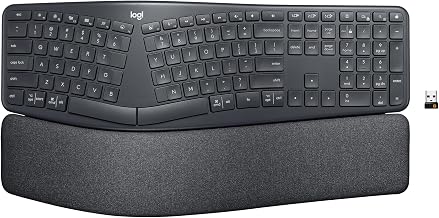
Split keyboards separate the left and right key sections, allowing your hands and wrists to sit in a more neutral angle instead of the twisted position required by traditional flat boards. If you spend hours typing and your wrists ache by day’s end, a split layout can meaningfully reduce strain—but only if you pick the right design for your specific pain pattern and work style.
How Split Keyboards Reduce Wrist Pain
A traditional keyboard forces both hands into a pronated position—palms rotated inward and wrists bent sideways. Over eight hours of typing, this constant angle strains the flexor tendons and compresses the median nerve, which runs through the carpal tunnel in your wrist. Repetitive strain accumulates into inflammation, numbness, and pain.
Split keyboards address this by:
Separating the key sections so each hand can sit directly under your shoulder, eliminating the sideways wrist bend.
Allowing tenting (angling the keyboard so the outer edge is higher than the inner edge), which rotates your forearms into a more neutral supinated position.
Reducing ulnar deviation, the inward bend that aggravates carpal tunnel syndrome.
Anecdotal reports from long-running threads on r/mechanicalkeyboards and ergonomic product forums suggest users with diagnosed carpal tunnel or repetitive strain injury experience meaningful pain reduction within 1–3 weeks of switching to a properly configured split keyboard. That said, a split keyboard is a tool, not a cure—physical therapy, break frequency, and posture still matter.
Split vs. Ergonomic (Contoured) Keyboards: Which Helps More?
The two aren’t mutually exclusive. Contoured ergonomic keyboards (like the Microsoft Sculpt or Logitech Wave) curve the key surface to match your fingers’ natural shape and reduce finger travel distance. They’re easier to transition to and work well for mild wrist discomfort.
Split keyboards go further: they address the root cause—the twisted wrist angle itself—rather than just contouring the keys. Based on anecdotal reports from long-running Reddit threads and ergonomic product review sites, users with moderate-to-severe wrist pain see faster relief with a split layout than with a contoured board alone.
Best move: If your pain is mild, try a contoured ergonomic keyboard first. If pain persists after 2–3 weeks, or if you have a carpal tunnel diagnosis, a split keyboard is the next logical step.
Key Features That Matter for Wrist Pain Relief
Tenting and Negative Tilt
Tenting is the angle at which the outer edge of the keyboard is raised above the inner edge. It rotates your forearm out of pronation and into a more neutral or supinated position.
Adjustable tenting legs (found on Kinesis Freestyle2 for PC and similar models) let you dial in the angle that feels best; most users find 5–15 degrees optimal.
Fixed tenting (built into some designs) is less flexible but requires no setup.
Negative tilt (the inner edge higher than the outer) is rare and usually not helpful for wrist pain; avoid it unless you have a specific reason.
Key Travel and Actuation
Shorter key travel (the distance your finger presses down) reduces forearm fatigue. Mechanical switches typically require 1.5–2 mm travel before activation, while membrane switches need 3–4 mm.
Mechanical splits with 60–65 cN actuation force feel faster and require less pressure, reducing fatigue over long days.
Membrane splits are quieter and cheaper but demand more finger pressure and may aggravate pain if you already have inflammation.
Per teardown reviews on YouTube and manufacturer spec sheets, mechanical split keyboards like the Keychron Q11 QMK and Kinesis Freestyle Edge RGB consistently score higher for comfort during extended typing sessions.
Wrist Rest Design
A built-in or detachable wrist rest keeps your wrist in a neutral angle at rest, preventing the downward bend that occurs when you rest on the desk edge.
Detachable rests give you flexibility to remove them if you prefer, or swap in an aftermarket pad.
Gel or memory-foam pads conform to your wrist shape and feel more comfortable than hard plastic during long sessions.
Wired vs. Wireless: Trade-offs for Pain Relief
Wired splits (like the Kinesis Freestyle2 for PC) eliminate latency and battery anxiety, which appeals to writers and programmers who type for hours. Wired models are often cheaper and don’t require charging.
Wireless splits (like the Kinesis Freestyle Edge RGB) let you reposition the keyboard without a cable tether, which can reduce repetitive reaching and shoulder strain if you move between workstations. The trade-off is battery management and slightly higher cost.
For wrist pain specifically, the choice is personal: a wired keyboard won’t cure pain faster than wireless. Pick whichever fits your desk setup and mobility needs. If you move between rooms or desks often, wireless reduces the temptation to twist your torso to reach a fixed keyboard—and that postural benefit can matter.
Mechanical vs. Membrane for Wrist Comfort
Mechanical splits require less finger pressure and fatigue your forearm muscles less over an eight-hour day. Anecdotal reports from users with existing wrist pain suggest noticeably less soreness at day’s end with mechanical switches than with membrane.
Membrane splits are quieter, cheaper, and feel more like a traditional keyboard—useful if you share office space or have a tight budget. The downside: higher actuation force means your forearm muscles work harder, which can amplify pain if inflammation is already present.
Recommendation: If wrist pain is your primary concern, prioritize mechanical. If budget or noise is the constraint, a quality membrane split is still better than a flat traditional board, but expect a longer adjustment period.
Adjustment Period: What to Expect
Switching to a split keyboard feels weird at first. Your muscle memory is trained for a flat board, and the new angle will feel unnatural for 3–7 days.
Days 1–3: Based on user reports, typing speed typically drops 20–40%. Hands may feel awkward or fatigued (different muscles are engaged). This is normal.
Days 4–7: Speed climbs back toward baseline. Wrist pain may actually increase slightly as you adjust posture—this is not a sign the keyboard is wrong; it means your wrist stabilizers are working harder.
Weeks 2–4: Most users report meaningful pain reduction if the split design matches their anatomy. Speed returns to normal or better.
Beyond week 4: If pain hasn’t improved, the split may not be the right solution for you, or you may need to adjust tenting angle, wrist rest height, or desk posture.
Pro tip: Don’t switch cold turkey. Spend the first week using the split keyboard for 2–3 hours a day while keeping your old keyboard nearby for high-speed work. Gradually increase split-keyboard time as you adapt.
Budget vs. Premium: Where to Invest
Budget-tier splits like the Kinesis Freestyle2 for PC offer solid wrist relief and adjustable tenting without breaking the bank. They’re reliable, widely reviewed, and a safe first purchase if you’re testing whether a split layout helps.
Premium splits include custom mechanical builds, programmable macros, and boutique switch options. Unless you’re a keyboard enthusiast or have very specific ergonomic needs, premium pricing doesn’t translate to better wrist pain relief.
Where to invest: Put money into adjustability (tenting, wrist rest height) and mechanical switches, not brand prestige. A budget split with full tenting adjustment will outperform a premium flat keyboard for wrist pain.
Setup Tips for Maximum Relief
Even the best split keyboard won’t help if your desk setup is wrong. Here’s what matters:
Desk height: Your elbows should form a 90-degree angle when your hands rest on the keyboard. If your desk is too high, your shoulders hunch; too low, and your wrists bend downward.
Monitor position: Top of the screen at or slightly below eye level. If you look down, your neck rounds and upper back tension pulls on your wrists.
Keyboard distance: Keep the split keyboard close—about a hand’s width from the desk edge. Reaching strains your shoulders and wrists.
Tenting angle: Start at 10 degrees and adjust up or down based on comfort. There’s no universal “right” angle; it depends on your arm length and wrist anatomy.
Break frequency: Even with a perfect setup, take a 5-minute break every hour. Stand, shake out your hands, and stretch your wrists.
FAQ
Q: Can a split keyboard cure carpal tunnel syndrome?
A: No. A split keyboard reduces strain and can prevent wrist pain from worsening, but it won’t reverse nerve compression or inflammation. If you have diagnosed carpal tunnel, combine a split keyboard with physical therapy, anti-inflammatory medication (if prescribed), and potentially a nighttime wrist brace. See a doctor if pain persists beyond 4–6 weeks of using an ergonomic setup.
Q: How long does it take to feel relief?
A: Most users report noticeable improvement within 2–3 weeks of daily use, assuming the keyboard is properly adjusted and your desk setup is ergonomic. Some feel relief within days; others take a month. If you feel worse after a month, the split layout may not be right for your anatomy.
Q: Do I need a split keyboard if I use a vertical mouse?
A: A vertical mouse and a split keyboard address different strain patterns. A vertical mouse reduces pronation of the forearm; a split keyboard reduces sideways wrist bend. They work well together, but neither is a substitute for the other. If your wrist pain is primarily from mousing, a vertical mouse alone may help. If it’s from typing, a split keyboard is more important.
Q: What if my wrist pain is on only one side?
A: A split keyboard still helps because it removes the sideways bend from both wrists. However, if pain is localized to one wrist (e.g., from a previous injury), you may need to adjust that side’s tenting angle independently. Some split keyboards like the Kinesis Freestyle2 for PC allow per-side adjustment, which is useful here.
Q: Is a split keyboard worth it if I mostly use a laptop?
A: If you’re a laptop-only user, a split keyboard is worth the desk space. Laptop keyboards force even more wrist bend than traditional flat boards, so the relief from a split is often more dramatic. Pair it with a laptop stand to get your screen to eye level, and you’ve created a genuinely ergonomic setup.
Final Thoughts
A split keyboard addresses the biomechanical root of wrist pain—the twisted angle your wrists adopt on a flat board. It’s not a miracle cure, but it’s one of the most effective tools available for reducing typing-related strain, especially for people with carpal tunnel or chronic wrist pain.
The key is picking a model with adjustable tenting, a comfortable wrist rest, and mechanical switches if possible. Budget-tier splits perform nearly as well as premium models for pain relief; the difference is in durability and extra features. Start with a split that fits your budget and desk space, give yourself 3–4 weeks to adapt, and combine it with ergonomic desk setup and regular breaks.