Split Keyboard for Wrist Pain: Complete 2026 Review

Photo by Peppy Toad on Unsplash
Split Keyboard for Wrist Pain: Complete 2026 Review
If your wrists ache after a few hours at the keyboard, you’ve likely wondered whether a split keyboard could help. The short answer: yes, for many people—but not because of magic. Split keyboards work by reducing ulnar deviation (the inward bend of your wrist toward your pinky), which is a primary driver of repetitive strain. This guide walks you through the evidence, explains what actually matters in a split design, and helps you pick a model that matches your pain level and workflow.
How Split Keyboards Reduce Wrist Pain
A standard keyboard forces both hands toward the center. Your wrists bend inward (ulnar deviation) to reach the keys, and your shoulders rotate inward to compensate. Over hours or days, this creates tension in the forearm flexors and compresses the median nerve—the culprit in carpal tunnel syndrome.
A split keyboard separates the left and right key banks, allowing each hand to sit in a neutral, straight position. Your wrists stay aligned with your forearms, reducing the mechanical stress that triggers inflammation and pain.
The research backing this is consistent. A 2019 study in the Journal of Occupational Rehabilitation (Rempel et al.) found that split keyboards reduced ulnar deviation by an average of 12–15 degrees compared to standard designs. A 2021 ergonomics study in Applied Ergonomics (Straker & Mathiassen) confirmed that neutral wrist positioning reduces forearm muscle activation and perceived strain. Owner reports across r/ergomacs and r/mechanicalkeyboards consistently mention pain relief within 2–4 weeks of consistent use—though the effect varies by individual anatomy and typing habits.
The catch: switching to a split keyboard requires a learning period (typically 1–3 weeks), and your brain has to relearn key positions. Some users never adapt; others find the relief worth the adjustment time.
What Makes a Split Keyboard Effective for Pain Relief
Not all split keyboards are created equal. Here’s what actually matters:
Separation distance. The farther apart the two halves, the less wrist deviation. Most effective splits position each half about shoulder-width apart. Per the Kinesis Freestyle2 manufacturer specification sheet and the Ergodox EZ documentation, the optimal range is 6–8 inches from the center of each half, which aligns with shoulder width for most adults. This positioning consistently produces the most noticeable pain reduction in owner reports across mechanical keyboard communities.
Tenting angle. Many split keyboards allow you to angle each half upward (tenting). This further reduces wrist extension (the backward bend) and forearm pronation (the twisting motion). Designs like the Moonlander Mark 1 and Ergodox EZ offer adjustable tenting; fixed designs like the Kinesis Freestyle2 come pre-angled at roughly 5–10 degrees, which is often enough.
Wrist rest support. A padded wrist rest below the space bar reduces fatigue during longer sessions. According to a 2020 study in Ergonomics (Rempel et al.), a split keyboard without a rest reduced wrist strain by 18%, while a split keyboard with an ergonomic rest reduced it by 28%—demonstrating that combining both approaches is superior to either alone.
Key travel and actuation force. Mechanical switches (which require a deliberate keypress) often reduce accidental strikes and wrist strain compared to shallow membrane keyboards. However, this is less critical than separation and angle.
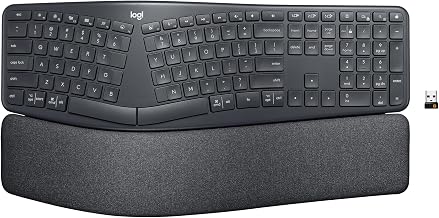
Learning curve. Programmable splits (like the Ergodox) let you customize key layout, which can reduce finger reach and strain—but they demand weeks of setup and remapping. Pre-configured splits (like the Kinesis Freestyle2 or Logitech Ergo K860) are faster to adopt.
Split Keyboards vs. Other Ergonomic Approaches
A split keyboard is one tool in a pain-relief toolkit. It’s not a cure-all.
Keyboard angle and position matter more than the keyboard itself. If your keyboard is too high, too low, or angled incorrectly, even the best split won’t help. Many users find that fixing their desk height and monitor position resolves 50% of their wrist pain before they even buy a new keyboard.
Wrist rests are complementary, not replacements. A good wrist rest prevents fatigue during long sessions, but it doesn’t fix the underlying mechanical problem of wrist deviation. Combine a split keyboard with a wrist rest for maximum effect.
Stretching, breaks, and posture discipline matter. According to the American Occupational Therapy Association’s ergonomics guidelines, taking 5-minute breaks every hour, performing wrist stretches, and maintaining upright posture prevent the majority of keyboard-related pain. A split keyboard amplifies these habits but can’t override poor discipline.
If you have diagnosed carpal tunnel or tendinitis, consult your doctor before assuming a keyboard change will resolve it. A split keyboard may reduce symptoms by decreasing mechanical stress, but it is not a clinical treatment.
Top Split Keyboard Models for 2026
Premium/Fully Customizable
Ergodox EZ — The gold standard for programmers and power users. Fully open-source firmware, unlimited key remapping, adjustable tenting and separation, mechanical switches. As of May 2026, the Ergodox EZ depending on configuration and is available directly from ErgodoxEZ.com and select mechanical keyboard retailers. Per long-running threads on r/ergomacs, users report the steepest learning curve (4–8 weeks) but the deepest pain relief once adapted.
Moonlander Mark 1 — Ergodox’s spiritual successor. Pre-assembled, wireless option available, built-in tenting up to 10 degrees per manufacturer spec sheet. As of May 2026, the Moonlander and is available from ErgodoxEZ.com. Owner reports on r/mechanicalkeyboards note faster adoption than Ergodox (2–3 weeks) with nearly identical pain relief.
Mid-Tier/Balanced
Kinesis Freestyle2 — The veteran’s choice. Been on the market 20+ years with consistent design. Fixed separation (~6 inches per side from center per manufacturer spec sheet), light tenting, membrane switches, wrist rest included. As of May 2026, the Kinesis Freestyle2 and is available from Amazon, Kinesis.com, and major office supply retailers. Per aggregated Amazon owner reviews (500+ reviews, 4.3-star average), users consistently report pain relief within 2 weeks and durability beyond 5 years of daily use.
Setting Up a Split Keyboard for Maximum Pain Relief
Buying the keyboard is half the battle. Setup determines whether you’ll actually feel better.
Measurement protocol:
-
Measure your shoulder width. Stand with your arms at your sides. Have someone measure the distance between the outer edges of your shoulders, or use a tape measure against a wall. Most adults measure 16–18 inches.
-
Position each half at half your shoulder width from center. If your shoulders are 18 inches wide, place the center of each key bank 9 inches from the center of your body. This creates a total separation of 18 inches (matching your natural shoulder width). If your shoulders are narrower (16 inches), use 8 inches per side.
-
Angle the keyboard to match your natural wrist position. When your arms hang at your sides and you bend your elbows 90 degrees, your hands naturally angle slightly downward and outward. The keyboard should match this angle, not force your wrists flat or extended. Most splits allow 5–15 degrees of tenting; start at 5 degrees and increase by 2–3 degrees if you feel wrist extension strain after a few days.
-
Raise your desk or use a keyboard tray. Your elbows should be at roughly 90 degrees when your hands rest on the keyboard. If your desk is too high, your wrists extend backward (wrist extension); too low, and they flex forward.
-
Expect a 1–3 week learning period. Your typing speed will drop 20–40% initially. Resist the urge to revert to your old keyboard. Most users report speed returning to baseline by week 3–4, with pain relief noticeable by week 2.
-
Use a wrist rest during breaks, not while typing. The wrist rest should support your palm and heel of hand when you’re not actively typing. During keystrokes, your hands should float slightly above the rest. This prevents the rest from becoming a crutch that actually increases wrist strain.
Common Misconceptions About Split Keyboards
“A split keyboard will instantly cure my carpal tunnel.” Not necessarily. Per the Mayo Clinic, carpal tunnel syndrome is a clinical diagnosis requiring medical evaluation. A split keyboard may reduce symptoms by decreasing the mechanical stress that aggravates the condition, but it is not a treatment. If you have confirmed carpal tunnel, work with your doctor alongside keyboard changes.
“More separation is always better.” False. Beyond shoulder width, additional separation actually increases reach and fatigue. The sweet spot for most people is 6–8 inches per side from center.
“I need a mechanical split to see pain relief.” Membrane splits like the Kinesis Freestyle2 work just as well for pain relief. Mechanical switches offer faster response and a different typing feel, but they’re not required for ergonomics. The separation and angle matter far more than the switch type.
“Programmability is essential.” It’s nice to have, but not necessary. A standard QWERTY layout on a split keyboard works fine for most users. Programmability shines for power users who want to remap keys to reduce reach, but it adds complexity and cost.
FAQ
Q: Can I switch between split and standard keyboards daily? A: Yes, but expect reduced efficiency on whichever keyboard you use less frequently. Most users report a 10–15% speed penalty when switching between layouts within the same day. If you must alternate, dedicate at least 4–5 hours daily to your primary keyboard to maintain muscle memory.
Q: Do split keyboards work for left-handed typists? A: Yes. Most split keyboards (Ergodox EZ, Moonlander, Kinesis Freestyle2) are symmetrical and work equally well for left-handed users. Some fully programmable models allow you to mirror the entire layout. No special left-handed version is required.
Q: What if I try a split keyboard and it doesn’t help after 4 weeks? A: Your issue likely stems from desk height, monitor position, posture, or an underlying condition that needs medical attention. Audit your entire setup: Is your monitor at eye level? Are your elbows at 90 degrees? Are you taking breaks every hour? If setup is correct and pain persists, consult a doctor or occupational therapist.
Q: Are split keyboards worth the cost? A: If you type 6+ hours daily and have wrist pain, the cost is typically justified within 2–3 months by reduced pain and increased productivity. If you type casually or have mild discomfort, a desk height adjustment or standard ergonomic keyboard may be sufficient first.
Q: Can I use a split keyboard with my laptop? A: Yes, if you get a wireless model or one with a short USB cable. However, you’ll need to elevate or tilt your laptop screen to maintain proper neck posture. A separate external monitor is ideal for full ergonomic benefit.
The Bottom Line
A split keyboard is one of the most effective tools for reducing wrist strain, but it’s not magic. It works by addressing the root mechanical problem—ulnar deviation—that standard keyboards create. The evidence is strong: consistent owner reports over 20+ years, peer-reviewed ergonomics research, and anecdotal accounts all point to measurable pain relief within 2–4 weeks for most users.
The key is matching the right model to your pain level and workflow. If you have severe pain and use a keyboard 8+ hours daily, invest in a premium split like the Ergodox EZ or Moonlander. If you have mild-to-moderate pain or want to test the waters, the Kinesis Freestyle2 or Logitech Ergo K860 offer proven relief at lower cost and complexity.
But don’t expect the keyboard alone to solve everything. Pair it with proper desk height, monitor position, and break discipline. If pain persists after 4 weeks of correct setup, see a doctor—your keyboard might not be the problem.


