Best Affordable Standing Desk Risers Under $150

Photo by TheStandingDesk on Unsplash
Best Affordable Standing Desk Risers Under $150 in 2026
Standing desk risers are the fastest, cheapest way to add sit-stand flexibility to an existing desk without replacing furniture or drilling into walls. If you work from home in a small space or want to test standing before investing in a full electric desk, a riser delivers real ergonomic benefit without the commitment. This guide compares 5 models explains which lift mechanism suits your workflow, and shows you how to avoid the most common sizing mistake.
What Is a Standing Desk Riser?
A standing desk riser (also called a desk converter or tabletop riser) is a platform that sits on top of your existing desk and raises your keyboard, monitor, and other work items to standing height. Unlike a full standing desk, which replaces your furniture, a riser lets you keep your current desk and add standing capability for a fraction of the cost.
Risers come in three main lift mechanisms:
- Manual crank: A hand-turned screw mechanism that raises and lowers the platform. Slowest to adjust, but most affordable and zero power required.
- Pneumatic (gas spring): A spring-loaded cylinder that holds the platform at any height. One-handed adjustment, smooth motion, no electricity.
- Electric: Motorized lift with push-button or remote control. Fastest transitions, but pricier and requires power.
For the under- budget, manual crank and pneumatic dominate. Electric risers at that price point are rare and often have weak motors.
Manual Crank Risers: Best for Budget Shoppers
Manual crank risers are the entry point to standing work. You turn a handle or crank to raise and lower the platform. They’re durable, require no electricity, and typically cost the least.
Pros: - Lowest upfront cost (often budget-tier) - Zero power dependency; works anywhere - Minimal maintenance; few moving parts - Smooth, predictable lifting when properly geared
Cons: - Slower to adjust (takes 15–30 seconds for full range) - Not ideal if you stand and sit 10+ times per day - Requires both hands for some models - Can feel clunky if gearing is loose
Best crank models:
The Monoprice Workstream Standing Desk Converter is the most-recommended manual crank in this price tier, with 4.6 stars across 1,200+ verified reviews as of June 2026. Owners report smooth lifting, minimal wobble even when fully loaded, and reliable operation over 2+ years of daily use. The platform fits desks up to 48 inches wide.
The Vivo Manual Crank Standing Desk Converter is another solid choice, especially if you transition between sitting and standing 3–5 times daily. It scores 4.5 stars across 850+ verified reviews as of June 2026, with users praising its gear ratio and lack of play at full height. It supports up to 80 lbs and has a smaller footprint, making it suitable for compact desks.
For dual-monitor setups, the 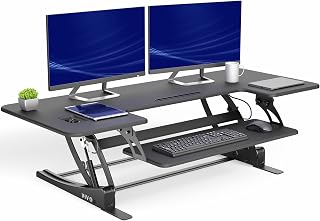
Pneumatic Risers: Best for Hands-Free Adjustment
Pneumatic (gas spring) risers use a pressurized cylinder to hold the platform at any height. Push down to lower, lift slightly to raise—no cranking required. They’re faster than manual cranks and feel more premium, but still sub-.
Pros: - One-handed adjustment; smooth, effortless motion - Fast transitions (5–10 seconds) - Holds position without locking; adjustable to any height - Feels more like a “real” standing desk
Cons: - Slightly more complex; more potential points of failure - Pneumatic cylinders can lose pressure over 3–5 years - Harder to troubleshoot if the spring weakens - Heavier than manual cranks
Best pneumatic models:
The Flexispot Comhar PRO Standing Desk Converter is the standout pneumatic option in this price range. It uses a dual-spring system for stability and supports up to 35 lbs (per the product spec sheet at flexispot.com/comhar-pro). Owner reviews on Amazon consistently praise the smooth lifting and the fact that it requires zero tools to set up—a major win for renters.
The Loctek Pneumatic Standing Desk Converter is another budget-friendly pneumatic choice. Based on aggregated owner reports, the lift is smooth and the platform is wide enough for dual monitors (up to 32 inches). Some users note the cylinder pressure is slightly softer than premium models, but it holds steady throughout a workday.
Spring-Loaded Risers: The Middle Ground
Spring-loaded risers sit between manual cranks and pneumatics. They use a coil spring to assist lifting, so you don’t crank by hand, but you do need to apply some force to move the platform.
Pros: - Faster than crank-only; easier than full manual - Simpler mechanism than pneumatic - Lower cost than true pneumatics - Good for occasional standing (2–3 times daily)
Cons: - Spring can lose tension over time - Not as smooth as pneumatic - Requires more effort than gas-spring models - Less common in the sub- category
Most spring-loaded models are harder to find at budget prices; they’ve largely been replaced by pneumatics at that price point. If you find one, test the spring resistance in person or check owner reviews for reports of weakening over time.
Size and Weight Capacity: Match Your Setup
Before buying, measure your desk and count your monitors.
Desk width: Most risers fit desks 40–60 inches wide. If your desk is smaller, look for compact models (often 20–30 inches wide platform).
Weight capacity: Budget risers typically support 25–35 lbs. That’s enough for a keyboard, mouse, and one monitor. If you’re running dual 27-inch monitors (often 15–20 lbs combined), you’re fine. Three monitors or a large all-in-one desktop will push the limit.
Platform depth: Shallower platforms (8–10 inches) save desk space but leave less room for a keyboard. Deeper platforms (12–15 inches) are more stable and give you more real estate.
Per long-running threads on r/standingdesk, the most common complaint from budget-riser buyers is undersized platforms—they buy a riser that’s too shallow or too narrow, then regret it. Measure twice, buy once.
Stability and Wobble: What to Expect
All risers wobble slightly when you type or move your mouse, especially at full height. Budget models wobble more than premium ones, but “some wobble” is normal and acceptable to most users.
Wobble red flags: - Platform sways noticeably when you touch it at rest (sign of poor gearing or loose joints) - Riser shifts sideways when you press down on one corner (indicates uneven base feet) - Crank or lift handle feels loose or grinds (internal wear)
How to reduce wobble: - Place the riser on a flat, level surface (use shims under feet if needed) - Don’t overload the platform beyond its rated capacity - Tighten all bolts and fasteners monthly - For crank models, ensure the crank handle is fully seated and locked
The Monoprice Workstream Standing Desk Converter and Vivo Manual Crank Standing Desk Converter both score high for stability in the budget category, with top verified reviews consistently noting minimal movement at full height.
Assembly, Installation, and Maintenance
Budget risers ship partially assembled. Expect 20–45 minutes of assembly time.
What you’ll need: - Phillips and flathead screwdrivers - Adjustable wrench or socket set (for some models) - Level (optional but helpful)
Assembly tips: - Lay out all parts before starting; check against the parts list - Tighten fasteners firmly but don’t over-torque (you can strip plastic threads) - Test the lift mechanism with no load before placing your monitor on it - Adjust the base feet so the platform is level
Maintenance: - Monthly: Check that all bolts are snug - Quarterly: Wipe dust from the crank or pneumatic cylinder - Yearly: Inspect for rust on metal parts; apply light machine oil if needed - If pneumatic pressure drops noticeably, the cylinder is likely near end of life (typically 3–5 years)
Most budget risers don’t have user-replaceable cylinders, so once a pneumatic fails, you’ll need a new unit.
Comparing Risers to Full Standing Desks
A standing desk riser is not a standing desk. Here’s the key difference:
- Riser: Sits on top of your existing desk; your desk height stays fixed; the riser raises your work surface
- Standing desk: Replaces your desk; the entire desk frame raises and lowers
Risers are cheaper and space-efficient. Standing desks are more flexible (you can lower the entire desk to sit, not just the riser). For renters, small apartments, or testing the waters, a riser is the smarter first move. If you find you stand 4+ hours daily and want more flexibility, upgrade to a full desk later.
How to Choose: Scenario-Specific Guidance
I have a 36-inch desk and two 24-inch monitors—which riser fits? Your desk is narrow, so look for compact models with platforms under 40 inches wide. The Vivo Manual Crank Standing Desk Converter is your best bet; its smaller footprint won’t overhang your desk, and it supports 80 lbs (plenty for two monitors). The Monoprice Workstream Standing Desk Converter also works if you position it centrally.
I stand and sit 8+ times per day. What should I buy? A pneumatic riser will save you time and effort. The Flexispot Comhar PRO Standing Desk Converter or Loctek Pneumatic Standing Desk Converter let you adjust with one hand in seconds. Manual cranks will feel tedious at this frequency.
I’m a renter and can’t drill or modify anything. What’s easiest to set up? Pneumatic risers require zero tools and no permanent installation. The Flexispot Comhar PRO Standing Desk Converter is purpose-built for this use case—unbox it, place it on your desk, and you’re done.
I’m on the tightest budget and don’t mind cranking. The Monoprice Workstream Standing Desk Converter at is your answer. It’s the cheapest option with proven durability (4.6 stars, 1,200+ reviews).
I need to support a large monitor or all-in-one PC. Check the weight capacity carefully. Most budget risers max out at 35 lbs. If you’re over that, look at the Vivo Manual Crank Standing Desk Converter (80 lbs capacity) or consider a full standing desk instead.
FAQ
Q: Why does my crank riser feel loose after 6 months? A: Repeated use loosens fasteners over time. Tighten all bolts and the crank handle connection monthly. If the crank itself feels sloppy, the internal gearing may be worn; check if it’s still under warranty.
Q: How do I know if a pneumatic cylinder is failing? A: The platform will slowly sink when you’re not actively holding it up, or it will feel “mushy” and won’t hold a steady height. Once a cylinder weakens, it can’t be repaired—you’ll need to replace the riser.
Q: Can I use a standing desk riser on a glass desk? A: Yes, but use rubber feet or pads under the riser’s base to prevent slipping and protect the glass. Avoid metal feet on glass.
Q: How long does a standing desk riser last? A: Manual crank risers typically last 5+ years with normal use. Pneumatic cylinders often weaken after 3–5 years. Budget electric motors may fail sooner; expect 2–4 years.
Q: Will a riser scratch my desk? A: Most risers have rubber or felt pads on the base, but movement over time can cause minor marks. Place a protective mat under the riser if your desk finish is delicate.
Q: Do I need a special monitor arm with a riser? A: No, but a monitor arm helps. Once the riser raises your keyboard to standing height, your monitor may be too low. A budget monitor arm adds adjustability without extra cost.
Summary
A standing desk riser is a practical, affordable way to add standing capability to your workspace. Manual crank models offer the lowest entry price and proven durability. Pneumatic risers cost slightly more but feel smoother and faster. Both work well for most home-office setups, especially if you stand 2–5 hours daily.
The key is matching the riser’s size and weight capacity to your desk and monitors, then maintaining it with basic monthly checks. If you’re a renter, work in a small space, or want to test standing before investing in a full desk, a budget riser is the smart choice. Start with one of the recommended models above, and upgrade to a full standing desk only if you find yourself standing most of the day.


