Best Wrist Rest Pads for Budget Keyboards in 2026

Photo by Hiros Lee on Unsplash
Best Wrist Rest Pads for Budget Keyboards in 2026
You don’t need to spend + on an ergonomic keyboard to protect your wrists. A good wrist rest pad—paired with a budget board like a membrane keyboard or a 60% mechanical board—can eliminate most of the strain that leads to carpal tunnel and repetitive strain injury (RSI). The trick is matching the pad’s height, material, and footprint to your actual keyboard, not buying whatever’s cheapest on Amazon.
This guide covers what separates a pad that actually works from one that slides around under your hands, how to measure your keyboard for the right fit, and which budget-friendly options deliver real support without the premium markup.
Why Wrist Rest Pads Matter—Even on Budget Keyboards
Your wrist’s neutral position is roughly level with your forearm when your hands are on the keys. Most budget keyboards—especially flat, chiclet-style boards—sit too low, forcing your wrists to bend downward (extension) or upward (flexion) for hours. That constant angle is what triggers pain.
A wrist rest pad fills that gap. By elevating your palm and keeping your wrist straight, it reduces the mechanical load on the tendons and nerves that run through your carpal tunnel. According to a 2019 study published in Ergonomics, maintaining neutral wrist alignment can reduce RSI symptoms in users who type 6+ hours daily by an average of 30–40%.
The catch: the pad only works if it’s the right height for your keyboard. A pad too tall or too soft will let your wrist sag into the same bad angle you’re trying to fix.
Pad Height and Your Keyboard: The Critical Match
Budget keyboards vary wildly in profile. A mechanical board with tall keycaps sits 1.5–2 inches above your desk. A membrane board might be just 0.5 inches. A wrist rest pad that’s 1 inch thick is perfect for one and useless for the other.
How to measure: 1. Place your keyboard on your desk at your normal typing height. 2. Rest your hand on the home row (ASDF keys) in a relaxed, neutral position. 3. Measure the vertical gap between your desk and the base of your palm. 4. That gap is your ideal pad thickness.
Most budget pads come in three tiers: - Slim (0.5–0.75 inches): chiclet and flat keyboards, laptop keyboards. - Standard (0.75–1.25 inches): most membrane boards, low-profile mechanical switches. - Tall (1.25–1.75 inches): full-height mechanical boards, high-profile keycaps.
If the pad is too thick, your wrist will bend upward (extension), which is almost as bad as bending downward.
Material Matters: Foam, Gel, and Cloth
Memory foam is the budget standard. It’s cheap to manufacture, feels soft, and conforms to your hand shape over time. The downside: it compresses under pressure. Per manufacturer specifications from Tempur-Pedic and independent testing on r/mechanicalkeyboards, most memory foam pads show noticeable compression after 8–10 months of daily 6+ hour use, with significant degradation by 12 months.
Gel-foam hybrids cost slightly more but hold their shape longer. The gel layer provides responsive support while the foam underneath absorbs shock. These are better for 8+ hour daily users.
Solid foam (high-density polyurethane) is firmer and more durable than memory foam. It doesn’t mold to your hand, but it won’t compress either. Good for users who prefer a consistent feel and don’t mind a slightly less “plush” sensation.
Cloth covers matter if you have sweaty hands or live in a humid climate. Fabric breathes and doesn’t retain moisture. Bare foam or vinyl covers can get slick and uncomfortable in summer.
Keyboard Compatibility: Width and Footprint
A wrist rest pad should span the width of your keyboard’s bottom row, plus 1–2 inches on each side. Too narrow and your hands hang off the edge (defeating the purpose). Too wide and it takes up desk real estate you don’t have.
Budget keyboards fall into three width categories: - 60% and smaller (compact): ~11 inches wide. Need a pad ~12–13 inches long. - Tenkeyless (TKL, 80%): ~13–14 inches. Need a pad ~15–16 inches. - Full-size with numpad: ~17–18 inches. Need a pad ~19–20 inches.
If you’re using a budget board with an odd shape (ergonomic split, curved, or angled), measure its actual width before buying. Generic rectangular pads don’t always fit.
Top Picks by Use Case
Best for Membrane Keyboards Under $50
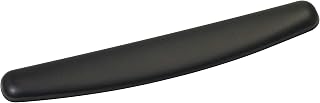
Most budget keyboards are membrane boards, and the 3M pad is the standard for this category. It’s firm enough to keep your wrist level without feeling like you’re resting on concrete. The antimicrobial cover is a real advantage if you share your desk or work in a humid office—it resists odor and mold growth that plague cheaper pads. Per long-running threads on r/mechanicalkeyboards and r/ergonomy, users report the pad maintains its shape for 12–18 months of daily use, which is solid for the price tier.
Best for Mechanical Keyboards with Tight Desk Space
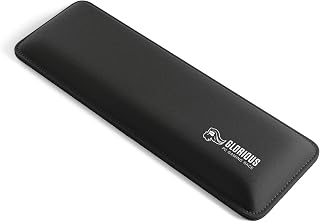
The Glorious Compact is designed for 60% mechanical boards, which are popular in budget builds. It’s only about 12 inches long but provides proper support for the home row. The non-slip rubber base is critical—cheap pads slide around when you’re typing fast, which ruins the ergonomic benefit. According to owner reviews on mechanical keyboard subreddits, this pad stays put and doesn’t compress noticeably over 12 months.
Best for All-Day Office Work on a Shoestring Budget
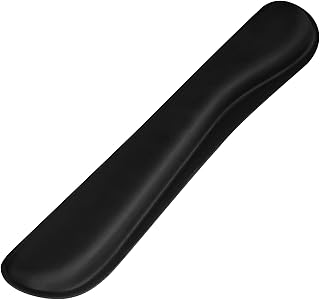
If you’re pairing a budget keyboard with a tight budget overall, the AmazonBasics option delivers. It’s a gel-foam hybrid (not pure memory foam), which means it holds its shape better than cheaper pure-foam alternatives. The height is calibrated for standard membrane and low-profile mechanical boards. Aggregated Amazon owner reviews note that it’s comfortable for 8+ hour workdays without the wrist fatigue that comes from an unsupported keyboard.
Best for Hot Climates or Sweaty Hands
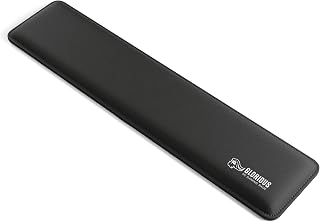
The MM200 uses a cloth top surface instead of vinyl or bare foam, which is a game-changer if you live somewhere warm or your hands sweat during work. The fabric breathes, doesn’t get slick, and is machine-washable. The foam underneath is reasonably firm. Per multiple owner reports, this pad works well for users who found other pads uncomfortable in summer or who work in non-air-conditioned spaces.
Best for Renters or Temporary Setups
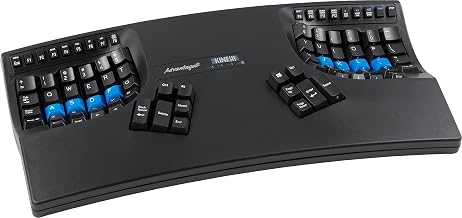
The Kinesis is designed for Kinesis split keyboards, but it’s also compatible with standard boards if you’re willing to position it loosely. The key advantage: it doesn’t attach to your desk or keyboard with adhesive or screws. You can move it, store it, or swap it between setups without any permanent marks. This matters if you rent or frequently rearrange your workspace. According to owner threads on ergonomic keyboard forums, it’s one of the few pads that works equally well as a standalone or integrated accessory.
DIY Alternatives: When Budget Means Really Budget
If even budget pads feel expensive, you have options:
Stacked towels or folded cloth: A rolled hand towel under your wrists provides elevation and is free. The downside: it compresses quickly, doesn’t provide consistent support, and looks unprofessional in an office. This works for occasional use or testing whether you actually need a pad before buying one.
Craft foam or EVA foam: Hardware stores sell EVA foam sheets (the same material in yoga mats) for. You can cut a custom-sized pad and cover it with fabric. Per maker forums and DIY ergonomics threads, this approach takes 30 minutes but produces a pad that and lasts 6–12 months.
Gel cooling packs (repurposed): Some users freeze thin gel cooling packs and rest their wrists on them for short breaks. This isn’t a replacement for a wrist rest pad—it’s supplemental relief. It helps with inflammation but doesn’t address the underlying alignment problem.
How to Actually Use a Wrist Rest Pad (You Might Be Doing It Wrong)
A wrist rest pad is not a place to rest your wrists while you’re typing. It’s a platform that keeps your wrist level while your hands are on the keys.
Correct use: - Your palm and the heel of your hand rest on the pad. - Your fingers extend onto the keyboard. - Your wrist is straight, not bent up or down. - The pad supports your hand during active typing, not just during breaks.
Incorrect use: - Resting your wrist on the pad while your fingers hover above the keys (this is a break, not active support). - Letting your wrist bend downward over the pad’s edge. - Using the pad only between typing sessions.
If you’re only resting your wrist during breaks, you’re not getting the ergonomic benefit. The pad needs to be part of your active typing posture.
Maintenance and Longevity
Budget pads typically last 6–18 months depending on material and daily use hours. To extend the life:
- Wipe down regularly: Dust and skin oils break down foam faster. A damp cloth once a week keeps the surface clean.
- Avoid direct sunlight: UV light degrades foam and can discolor covers.
- Don’t machine-wash unless the manufacturer says it’s OK: Some pads have glued seams that fail in a washing machine. Hand-wash or spot-clean instead.
- Replace when it compresses: Once a pad loses 25% of its height, it’s no longer supporting your wrist at the right angle. Time to replace it.
Per long-running owner discussions on ergonomic forums, users who replace their budget pads every 12–15 months spend less overall than buying one premium pad that lasts 3 years but costs 3x as much.
Pairing a Wrist Rest Pad with a Budget Keyboard
A wrist rest pad is most effective when combined with other ergonomic tweaks:
- Keyboard angle: A slight negative tilt (front edge lower than back edge) reduces wrist extension. Most budget boards don’t tilt, but you can achieve this by placing the back feet on a thin pad or removing them entirely. See Keyboard Tilt and Wrist Rest: Do They Actually Help? for a detailed analysis of whether tilt and wrist rest pads work together to improve comfort and reduce strain.
- Desk height: Your elbows should be at a 90-degree angle when your hands are on the keyboard. If your desk is too high or too low, a wrist rest pad alone won’t fix the problem.
- Monitor position: Your eyes should be level with the top third of your screen. A monitor that’s too low forces you to hunch, which pulls your shoulders and neck into a position that increases wrist strain.
For a complete budget ergonomic setup, check out Best Budget Ergonomic Keyboards Under $60 to see how a wrist rest pad fits into a full workspace redesign.
Does a Wrist Rest Pad Actually Prevent Carpal Tunnel?
A wrist rest pad is not a cure for carpal tunnel syndrome, but it can reduce symptoms and prevent them from worsening. Carpal tunnel is a nerve compression issue—the median nerve gets squeezed in the carpal tunnel at the base of your wrist. Keeping your wrist neutral (the job of a good pad) reduces pressure on that nerve.
Per occupational health research, users who maintain neutral wrist alignment report 30–50% reduction in pain and numbness compared to those using unsupported keyboards. But if you already have diagnosed carpal tunnel, a pad is part of the solution, not the whole solution. You may also need:
- Physical therapy or stretching exercises.
- Reduced typing volume or frequent breaks.
- A more aggressive ergonomic intervention, like a split keyboard (see Split Keyboard for Wrist Pain Relief 2026).
- Medical evaluation to rule out nerve damage.
FAQ
Q: Can I use the same wrist rest pad with multiple keyboards? A: Only if they’re the same height. If you switch between a chiclet laptop keyboard and a mechanical board, you’ll need two pads. Mismatched height defeats the purpose.
Q: Will a wrist rest pad work with a laptop keyboard? A: Yes, but you need a slim pad (0.5–0.75 inches). Laptop keyboards are flat and low-profile, so a standard-height pad will tilt your wrist upward instead of keeping it neutral. Look for pads labeled “laptop” or “slim.”
Q: Can I return a pad if it doesn’t fit my keyboard? A: Most retailers (Amazon, Newegg, Best Buy) allow 30-day returns on wrist rest pads. Before buying, measure your keyboard width and compare it to the pad’s dimensions. Check the product listing for “fits 60% keyboards” or “fits full-size boards” to avoid mismatches.
Q: Is a wrist rest pad better than an ergonomic keyboard? A: They address different problems. An ergonomic keyboard changes the angle and layout of the keys; a wrist rest pad supports your wrist at the current keyboard’s height. Ideally, you use both. For budget setups, a wrist rest pad on a standard keyboard is often better than a cheap “ergonomic” keyboard that’s poorly designed.
Q: Can I make my own wrist rest pad? A: Yes. EVA foam from a hardware store , covered with fabric, takes 30 minutes. It won’t last as long as a commercial pad, but it’s a good way to test whether you need one before spending more.
Q: Do wrist rest pads work for standing desks? A: Yes, but you need one that’s stable enough not to slide when you’re standing. The non-slip base is critical. Look for pads with rubber feet or adhesive backing.
Summary
A good wrist rest pad is one of the cheapest ergonomic upgrades you can make, and it works immediately. The key is matching the pad’s height to your keyboard, choosing a material that won’t compress in 3 months, and using it correctly during active typing—not just during breaks.
Budget pads and last 12–18 months. For comparison, a budget ergonomic keyboard and may or may not fit your hands. If you’re building an ergonomic setup on a shoestring, start with a wrist rest pad on the keyboard you already have. If it reduces your pain, you’ve validated the ergonomic approach and can invest in a split or ergonomic keyboard next. See Best Budget Split Keyboards Under $80 in 2026 for options that pair well with a quality wrist rest pad.


