As an affiliate, we may earn from qualifying purchases. This doesn't affect which products we recommend.
Ergonomic Keyboard Under $80: What Actually Works
If your wrists ache by 3 p.m. and you don’t want to drop several hundred dollars on a board like the ZSA Moonlander (+) or Kinesis Advantage360 (+), you’re in the right place. The under- tier of ergonomic keyboards is genuinely useful — you can get curved key wells, a tented profile, and palm support that takes real strain off your forearms. You just have to know which features matter and which are marketing.
What “ergonomic” actually means at this price
Most keyboards labeled ergonomic fall into one of three categories, and they’re not equally helpful:
Curved/wave keyboards — the key surface bows in the middle. Mild relief, easy adjustment.
Split fixed keyboards — the left and right halves are angled away from each other in a single chassis. Bigger relief from ulnar deviation (that pinky-outward wrist twist).
Tented keyboards — the middle is raised so your palms face inward slightly. This relieves forearm pronation, which is a separate problem from ulnar deviation.
The best ergonomic boards do all three. you’re usually getting one or two of those features, and that’s fine — partial ergonomic correction still helps. Per multiple owner reports across r/ergomechkeyboards and Amazon reviews, even the curved-only designs noticeably reduce wrist soreness within a couple of weeks of use.
If you’re not sure whether a split layout is worth the learning curve at all, our deeper writeup on the Best Split Keyboard for Wrist Pain walks through that specific tradeoff.
Features worth paying for under $80
Not every spec on the box matters. Here’s what I’d prioritize:
A genuine palm rest, not a thin lip. A padded, slightly cushioned rest keeps your wrists neutral instead of cocked upward. Cheap plastic lips don’t do much.
Negative tilt or zero tilt. Avoid keyboards that prop the back edge up — that’s the opposite of ergonomic and is a holdover from the typewriter era.
Wireless with replaceable or long-life batteries. Cable tension pulls your hands into bad positions. Per manufacturer spec sheets (Logitech ERGO K860: up to 24 months on two AAs; Microsoft Sculpt: up to ~3 years on two AAAs per Microsoft’s product page), the major Logitech and Microsoft ergo boards run multiple months to a couple of years on standard batteries.
OS compatibility you actually use. Windows-keyed boards work on Mac but the modifier layout will annoy you daily.
A familiar enough layout that you don’t have to relearn typing. True split mechanical boards have steep adjustment curves. At this price tier, stick to gentle curves unless you’re committed to the learning period.
Features you can skip
RGB lighting. Adds cost, doesn’t add comfort.
Mechanical switches at this price. Budget mechanical ergo boards exist, but the switches are usually mediocre. A well-built rubber dome from Logitech or Microsoft will feel better than a bargain-bin mechanical.
Programmable macro keys. Nice if you’ll use them, but most people don’t, and they bump the price out of this tier.
“Gaming ergonomic” branding. Almost always means a gently curved gaming keyboard, not a real ergonomic design.
Top picks under $80
These are the boards I’d actually recommend in this price range, based on aggregated owner reviews and manufacturer spec sheets.
The Sculpt is the gold standard for budget ergonomic typing and has been for years. Per Microsoft’s spec sheet, it features a split, curved, tented design with a domed center and a separate detachable numpad. The reverse-tilt cushion forces your wrists into a neutral position whether you want it or not — which is the point. Most owners report it’s the keyboard that finally let them type pain-free without dropping into the premium-mechanical price tier. Downsides: it’s been on the market a long time, the keys are quiet rubber dome (not mechanical), and the numpad is separate (some people love this, some hate it).
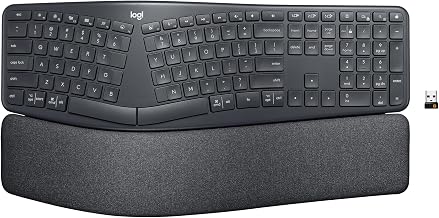
The K860 is the comfortable middle ground — split curved layout, integrated memory-foam palm rest, and adjustable negative tilt via flip-out feet at the front. Per the manufacturer spec sheet, it’s wireless via Bluetooth or Logi Bolt receiver, runs on two AA batteries with up to 24 months of claimed life, and supports both Windows and macOS modifier layouts out of the box — Mac users don’t need a separate SKU. Based on aggregated Amazon owner reviews, the layout is gentle enough that most touch typists adjust within a few days. It often sits right at the top of the under- window depending on the day; watch for sales.
If you don’t want a fully split design and just want something better than a flat board, the Wave Keys is Logitech’s newer wave-shaped keyboard with an integrated cushioned palm rest. It’s compact (no numpad), so it fits small desks and travel bags. Per the manufacturer spec sheet, it pairs with up to three devices via Bluetooth or the Logi Bolt receiver. The ergonomic correction is mild — this is a stepping-stone board, not an aggressive intervention. But mild is exactly what some people need.
The Freestyle2 is a true split keyboard (two halves connected by a flexible cable). At time of writing, the base wired configuration lists at on kinesis-ergo.com but routinely drops to on Amazon without the lift kit — check current pricing before buying, as it can hover just above or below our ceiling depending on the week. Per Kinesis’s spec sheet, you can separate the halves up to 9 inches apart, which is the most aggressive shoulder-opening posture correction you’ll get near this price. Caveat: without the optional tenting accessory (sold separately and pushes you over budget), it sits flat. If shoulder/upper-back tightness is your main issue, this is the pick. If wrist pronation is, look at the Sculpt or K860 instead.
How to actually adjust to an ergonomic keyboard
Buying the keyboard is the easy part. The first week is where most people give up. Some honest expectations:
Your typing speed will drop 20-40% for the first 2-5 days. This is normal even for gentle curved boards. Don’t panic.
You’ll hit the wrong keys around the split. Usually B, Y, and N are the troublemakers. Most owners report muscle memory rebuilds within a week or two.
Your wrists may feel worse for 2-3 days before they feel better. You’re using slightly different muscles. Push through unless you have sharp pain.
Don’t switch back and forth. If you alternate between your old flat board and the new ergonomic one, neither muscle memory takes hold. Commit.
Most under- ergonomic keyboards include a built-in palm rest, which is what you want. The problem with separate gel wrist rests is that people tend to rest their wrists on them while typing, which compresses the carpal tunnel — the opposite of the intent. Palm rests are for resting between bursts of typing, not during.
We went deeper on this in Wrist Rest for Keyboard: Do They Actually Help — short answer: the right kind helps, the wrong kind makes things worse.
Mechanical or membrane at this price?
Skip mechanical at this tier. Here’s why: a quality ergonomic mechanical keyboard with hot-swap switches and a split layout typically starts and usually crosses well past once you add keycaps and a tenting kit. The mechanical boards that do fit typically use unbranded switches, fixed (non-curved) layouts, and skip the palm rest entirely. You’d be paying for the click feel and losing the actual ergonomic features.
The Microsoft Sculpt and Logitech K860 use scissor or rubber-dome switches that are quiet, low-profile, and surprisingly pleasant. Based on aggregated owner reviews, they’re well-suited to long workdays and shared offices where mechanical clatter would annoy coworkers.
The keyboard is one piece of the puzzle
If your wrists hurt, the keyboard matters — but so does chair height, monitor distance, and how often you stand up. A great ergonomic keyboard paired with a too-low desk and a chair that doesn’t support your forearms won’t solve much. If you’re starting from scratch, our Budget Ergonomic Home Office Setup Under $500: Complete Guide sequences the upgrades in priority order so you don’t waste money.
FAQ
Is really enough for a real ergonomic keyboard?
Yes, for the gentle-to-moderate ergonomic tier. The Microsoft Sculpt and Logitech ERGO K860 are genuine ergonomic designs that physical therapists routinely recommend. Aggressive split mechanical boards (Kinesis Advantage, ZSA Moonlander, Glove80) live in a much higher price tier — but most people don’t need that level of correction.
Will a curved keyboard fix my carpal tunnel?
A keyboard alone won’t fix carpal tunnel syndrome, and anyone claiming it will is overselling. What it can do is reduce the wrist deviation that aggravates symptoms. Pair it with a vertical mouse, frequent breaks, and ideally a medical evaluation if pain persists.
How long is the adjustment period?
For gentle curved boards like the K860 or Wave Keys, most people are back to normal typing speed within 3-7 days. For true split boards, plan on 2-3 weeks.