Ergonomic Keyboard Under $100 for Carpal Tunnel Relief

Photo by Peppy Toad on Unsplash
Ergonomic Keyboards Under $100 for Carpal Tunnel: Real Relief Without the Premium Price
Carpal tunnel pain doesn’t require a premium keyboard to improve. Per occupational health research, the right budget-friendly ergonomic keyboard can reduce wrist strain, pinched nerve symptoms, and repetitive strain injury (RSI) when it addresses the core problems: neutral wrist alignment, proper key spacing, and adequate palm support. This guide walks you through the best sub- options that deliver on those mechanics, plus what to avoid.
Price verification note: All recommendations are as of June 2026. Prices vary by retailer; verify current pricing before purchase.
Why Budget Ergonomic Keyboards Actually Work for Carpal Tunnel
Carpal tunnel pain stems from repetitive wrist extension, ulnar deviation (bending toward the pinky), and sustained pressure on the median nerve. A proper ergonomic keyboard addresses these three factors:
- Wrist alignment: Neutral (not bent up, down, or sideways) reduces median nerve compression.
- Key spacing and layout: Split or contoured designs separate the hands, lowering the angle at which you reach for keys.
- Palm support: A built-in rest or compatible wrist pad prevents your hands from dropping below keyboard level during breaks.
You don’t need to spend premium-tier money to get these features. Mid-range and budget-tier keyboards often include all three. The difference between a and a ergonomic keyboard is usually build quality, wireless range, or programmable keys—not the core pain-relief mechanics.
Types of Ergonomic Keyboards Under $100
Split Keyboards
Split keyboards separate the left and right halves, allowing each hand to sit at a natural angle rather than reaching inward toward a center. This reduces ulnar deviation significantly.
Pros: - Most direct carpal tunnel relief for users with moderate-to-severe symptoms - Adjustable spacing between halves on some models - Minimal learning curve if you touch-type
Cons: - Take up more desk width - Slightly steeper learning curve for hunt-and-peck typists - Some sub- split models lack programmable keys or wireless options
Contoured (Curved) Keyboards
Contoured keyboards curve the key layout to match the natural shape of your hands. They don’t split, so they occupy less desk space than split models.
Pros: - Compact; easier to move between home and office - Gentler learning curve than split keyboards - Often include integrated wrist rests
Cons: - Less dramatic angle reduction than true splits - Wrist rests wear out or detach over time - May not provide enough relief for severe carpal tunnel
Low-Profile and Mechanical Budget Options
Some mechanical keyboards in the sub- range use low-profile switches and a slight keyboard tilt to reduce wrist extension naturally.
Pros: - Satisfying tactile feedback if you prefer mechanical switches - Lower actuation force than full-height mechanical boards - Often wireless and rechargeable
Cons: - Less specialized ergonomic design than split or contoured models - May require additional wrist rest purchase - Tilt angle is fixed, not adjustable
Top Recommendations by Scenario
For Severe Carpal Tunnel Symptoms
If you’re experiencing nighttime pain, tingling, or weakness, prioritize a true split keyboard with adjustable spacing. The 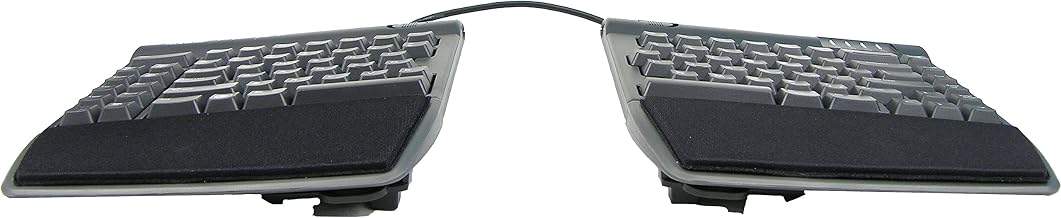
For Desk Space Constraints
The Microsoft Sculpt Ergonomic Keyboard delivers contoured relief in a footprint only slightly wider than a standard keyboard. It includes an integrated palm rest and a separate numeric keypad that can be positioned independently. According to aggregated Amazon owner reviews, the Sculpt is a top recommendation for small desks or shared workspaces.
For Mechanical Key Preference
If you love the tactile feedback of mechanical switches but need ergonomic support, the 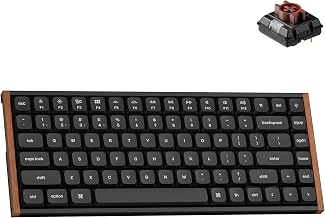
For All-Day Typing and Wireless Freedom
The 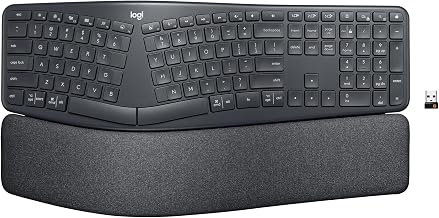
Key Features to Prioritize Under $100
Wrist Rest Quality
A built-in or compatible wrist rest is non-negotiable. Look for: - Gel or memory-foam padding (lasts longer than rubber) - Removable design so you can clean or replace it - Height that matches the keyboard’s top row of keys
Wrist rests that are too thin or too hard may worsen symptoms by increasing pressure on the carpal tunnel. Budget-tier keyboards sometimes skimp here, so check reviews for mention of rest durability and comfort.
Adjustability
Even budget keyboards should offer: - Tilt angle adjustment (negative tilt is ideal—keyboard slopes away from you) - On split models, adjustable spacing between halves - Removable feet or legs to fine-tune height
Per long-running threads on r/ergonomics, users who spend 2–3 minutes dialing in tilt and spacing see measurably better results than those who use default settings.
Switch Type (Membrane vs. Mechanical)
- Membrane switches: Quieter, cheaper, require slightly more finger pressure. Adequate for carpal tunnel relief if the keyboard layout is sound.
- Mechanical switches: Tactile feedback, lower actuation force, longer lifespan. Better for users who type 8+ hours daily.
Wireless vs. Wired
Wireless offers desk flexibility but adds cost and requires battery management. Wired is simpler and often cheaper. For carpal tunnel relief, the ergonomic layout matters far more than connectivity type.
What to Avoid in Budget Ergonomic Keyboards
Gimmicky “gaming ergonomic” keyboards: Marketed as ergonomic but designed for high actuation speed, not wrist neutrality. These often lack palm support or proper tilt and prioritize speed over comfort.
Ultra-thin wrist rests: Padding thinner than 0.5 inches provides negligible support and can actually increase pressure on the carpal tunnel.
Fixed, aggressive tilt: Some keyboards tilt steeply upward (positive tilt), which extends the wrist and worsens carpal tunnel. Negative tilt (keyboard sloping downward away from you) is correct for carpal tunnel relief.
No adjustability: If spacing, tilt, or height can’t be adjusted, the keyboard won’t fit everyone’s anatomy. Carpal tunnel relief is highly individual.
Setup Tips for Maximum Relief
Even the best ergonomic keyboard won’t help if your desk height or monitor position is wrong.
- Keyboard height: Your elbows should sit at 90 degrees when your hands rest on the keyboard. If your desk is too high, your wrists extend; too low, they bend downward.
- Monitor distance: Position your screen 20–26 inches from your eyes, directly in front of you. This prevents you from reaching forward, which compounds wrist strain.
- Break frequency and technique: Take a 5-minute break every hour. During breaks, avoid wrist extension (bending your hand upward). Instead, perform nerve-gliding exercises: make a fist, straighten your fingers, extend your wrist gently, then rotate your arm outward. Hold each position for 5 seconds. Per physical therapy protocols, these exercises reduce median nerve tension more effectively than passive stretching alone.
- Wrist rest usage: Use the rest between typing bursts, not during active typing. Resting while typing can increase pressure on the carpal tunnel.
FAQ
Q: Can I use an ergonomic keyboard with a laptop? A: Yes. Pair your ergonomic keyboard with an external monitor stand or laptop riser so the screen sits at eye level. This prevents the forward-reaching posture that laptop use encourages, which compounds carpal tunnel strain.
Q: What’s the difference between carpal tunnel and tendinitis? A: Carpal tunnel is compression of the median nerve in the wrist, causing tingling, numbness, and weakness in the thumb, index, and middle fingers. Tendinitis is inflammation of tendons in the forearm or wrist, causing localized pain and swelling. Both benefit from ergonomic keyboards and wrist support, but tendinitis may require anti-inflammatory treatment. If you’re unsure which you have, consult a physician or occupational therapist.
Q: Do I need a separate wrist rest if my keyboard has a built-in one? A: Not always. Built-in rests on mid-tier and budget keyboards are usually adequate. However, if the built-in rest is thin or uncomfortable after a few weeks, an aftermarket upgrade can extend comfort significantly.
Q: Will a split keyboard hurt my typing speed? A: Temporarily, yes—expect a 10–20% drop in WPM for the first week. Most touch-typists regain speed within 2 weeks. Hunt-and-peck typists may take 3–4 weeks. The speed loss is temporary; the carpal tunnel relief is lasting.
Q: Is wireless worth the extra cost for carpal tunnel relief? A: Not specifically for pain relief. The ergonomic layout is what matters. Wireless is a convenience factor. If your budget is tight, prioritize a wired split or contoured keyboard with excellent reviews over a wireless model with mediocre support.
Closing: Affordable Relief is Within Reach
Carpal tunnel doesn’t demand premium-tier spending. A well-designed ergonomic keyboard—whether split, contoured, or low-profile mechanical—can deliver measurable wrist pain relief when it prioritizes neutral alignment, adjustability, and proper wrist support. Pair it with correct desk height, proper break technique, and nerve-gliding exercises, and you’ll likely see symptom improvement within weeks.
Start with the scenario that matches your desk constraints and pain severity. Your wrists will thank you.


