Best Split Keyboard for Wrist Pain Relief 2026

Photo by Peppy Toad on Unsplash
Best Split Keyboard for Wrist Pain Relief 2026
Why Split Keyboards Actually Help Wrist Pain
Split keyboards separate the left and right halves, allowing your hands to sit at a natural angle rather than twisted inward on a traditional keyboard. This reduces pronation—the inward rotation of your forearms—which is a primary driver of wrist strain and repetitive strain injury (RSI).
The key isn’t just separation; it’s the angle. Many split keyboards also offer tenting—a slight upward angle—which further reduces strain on the wrist extensors (the muscles on the back of your forearm). Combined with proper desk height and monitor positioning, a split keyboard is one of the highest-ROI interventions for wrist pain that doesn’t require medical intervention.
That said, a split keyboard alone isn’t a cure-all. Wrist Rest Keyboard Pad: Do They Actually Help? explores whether wrist rests compound the benefit. The best results come from combining keyboard choice with ergonomic desk setup, frequent breaks, and stretching.
Mechanical vs. Membrane: Which Feels Better for Pain Relief
Mechanical keyboards (with individual switches under each key) and membrane keyboards (rubber dome under a sheet) have different ergonomic profiles.
Mechanical keyboards require less actuation force—typically 45–60g per switch (Cherry MX, Gateron, and Kailh are industry standards)—compared to membrane boards at 60–70g. This reduced force can lower finger fatigue during long typing sessions. The tactile feedback also helps users avoid bottoming out (pressing keys all the way down), which reduces wrist impact stress. Users with wrist pain often prefer mechanical splits because the combination of lower actuation force and shorter travel distance means less repetitive stress on the wrist and fingers.
Membrane keyboards are quieter and cheaper, but require more downward pressure to register a keystroke. For users with active wrist pain, this extra force can aggravate symptoms. Membrane splits exist (notably the Logitech ERGO K860), and they work well for office environments where noise matters—but if pain is your primary concern, mechanical is the safer bet.
Top Split Keyboards for Wrist Pain Relief
Kinesis Advantage360
Price range:
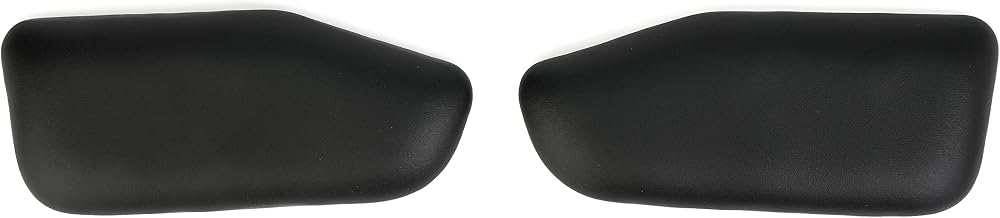
The Advantage360 is the gold standard for severe wrist pain and RSI. It features a fully sculpted, concave keycap layout that guides your fingers into the correct position, plus 22° fixed tenting and a built-in palm rest. The columnar key arrangement reduces finger travel distance compared to staggered layouts, lowering overall hand fatigue.
Owner reviews consistently report that the Advantage360 takes 3–7 days to adjust to, but after that adjustment period, users with chronic wrist pain describe it as transformative. The learning curve is real—the layout is radically different from QWERTY—but that’s also why it works. The keyboard enforces correct hand position.
Tradeoff: Premium-tier pricing and a steep learning curve make it overkill for mild discomfort, but essential for anyone with diagnosed carpal tunnel or advanced RSI.
Nuphy Air75
Price range:
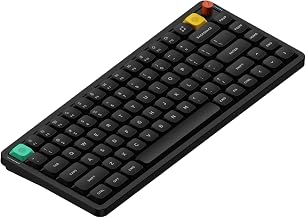
The Nuphy Air75 is a mid-tier split-compatible keyboard (75% layout, wireless, mechanical switches with 45–60g actuation) that delivers solid ergonomic value without the learning curve of a fully sculpted board. It’s not a true split—the halves don’t separate—but the columnar key arrangement and compact form factor reduce wrist rotation compared to full-size boards.
Per aggregated Amazon owner reviews, users appreciate the lightweight design (portable for remote work), hot-swap switch compatibility (you can customize tactile feel), and multi-device Bluetooth pairing. The sub- price point makes it accessible for users testing whether a mechanical split helps before investing in a high-end board.
Tradeoff: Not a true split, so it won’t solve severe pronation issues. Best for mild-to-moderate strain or as a stepping stone to a fully split design.
Logitech ERGO K860
Price range:
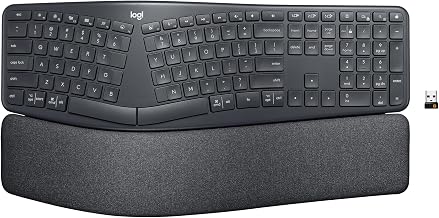
The ERGO K860 is a wireless, membrane split keyboard with a built-in wrist rest and low-profile design. It features 15° tenting and a true split layout, making it one of the few split options that prioritizes office aesthetics and quiet operation while still addressing pronation.
Per long-running owner threads on r/ergomechkeyboards, the K860’s main strength is the integrated wrist rest—no separate pad needed—and the split angle that reduces pronation without being aggressive. The low-profile membrane switches require less finger travel than mechanical boards, which some users with finger pain find beneficial.
Tradeoff: Membrane switches require more actuation force (60–70g) than quality mechanical boards, which can aggravate wrist pain in some users. Not customizable. Best for office environments where noise and aesthetics matter more than maximum ergonomic tuning.
Keychron K8 Pro
Price range:
The Keychron K8 Pro is a compact (75% layout), wireless mechanical keyboard with native Mac and Windows support, hot-swap switches (45–60g actuation), and a split-friendly columnar layout. It’s not a true split, but the compact form and mechanical switches make it a solid middle ground between budget and premium options.
Based on aggregated owner reviews, the K8 Pro appeals to Mac users who want a mechanical split experience without learning a radical new layout. The wireless connectivity and multi-device pairing are seamless per user reports. Build quality is mid-tier (aluminum frame, decent stabilizers), and the switches feel responsive without excessive noise.
Tradeoff: Not a true split, so it won’t fully address severe pronation. Better for users who want ergonomic improvement without abandoning familiar QWERTY muscle memory.
Moonlander Mark I
Price range:
The Moonlander is a true split, fully programmable keyboard with columnar key layout, adjustable tenting (0–40°), and hot-swap mechanical switches (45–60g actuation). It’s designed by ZSA Electronics and targets power users and programmers who want maximum customization.
Per teardown reviews on YouTube and long-running r/mechanicalkeyboards threads, the Moonlander’s main appeal is the firmware (QMK-based), which lets you remap any key, create custom layers, and even program macros. The adjustable tenting means you can dial in the exact angle your wrists prefer (most users find 20–25° optimal). The columnar layout is gentler on the fingers than staggered boards.
Tradeoff: Premium-tier pricing, steep learning curve (both layout and firmware), and requires soldering if you want to customize switches. Best for users who are comfortable with technical setup and value customization above all else.
Comparison Table: Key Specs at a Glance
| Keyboard | Price | Type | Tenting Angle | Actuation Force | True Split | Best For |
|---|---|---|---|---|---|---|
| Kinesis Advantage360 | Mechanical | 22° (fixed) | 70g (Cherry MX) | No | Severe RSI, carpal tunnel | |
| Nuphy Air75 | Mechanical | 0° (compact) | 45–60g | No | Budget, mild strain | |
| Logitech ERGO K860 | Membrane | 15° | 60–70g | Yes | Office, quiet operation | |
| Keychron K8 Pro | Mechanical | 0° (compact) | 45–60g | No | Mac users, customization | |
| Moonlander Mark I | Mechanical | 0–40° (adjustable) | 45–60g | Yes | Programmers, full customization |
How to Choose: Key Specs to Compare
When evaluating a split keyboard for wrist pain, focus on these factors:
- True split vs. compact layout: A true split (halves that separate) allows you to angle each half independently, addressing individual hand pronation. Compact split-compatible boards are a compromise for users who want mechanical benefits without full separation. See the comparison table above for which keyboards offer true splits.
- Tenting angle: Look for keyboards offering 15°–40° tenting. Per manufacturer specs and owner reports, 20–25° is the sweet spot for most users; anything less may not reduce strain meaningfully, and anything more can cause finger fatigue. The Moonlander Mark I and Kinesis Advantage360 let you adjust or dial in specific angles; the Logitech ERGO K860 offers fixed 15° tenting.
- Key travel and actuation force: Mechanical keyboards with 45–60g actuation force (linear or tactile switches) are easier on the wrist than heavier switches or membrane boards. Cherry MX, Gateron, and Kailh switches are industry standards. The Kinesis uses 70g switches, which is heavier but offset by its sculpted design.
- Wrist rest: Built-in or bundled rests reduce the need for separate purchases. The Logitech ERGO K860 and Kinesis Advantage360 include integrated rests; others require separate purchases.
- Customization: If you plan long-term use, hot-swap switches and programmable firmware let you refine the feel over time. The Moonlander Mark I and Keychron K8 Pro offer both; the Kinesis and Logitech offer neither.
Split Keyboard vs Ergonomic Keyboard: Which Reduces Wrist Strain? dives deeper into how split keyboards compare to other ergonomic designs if you’re still deciding between form factors.
Wireless vs. Wired: Does It Matter for Pain Relief?
Wireless split keyboards offer mobility and desk aesthetics, but wired boards provide zero latency and never need charging. For pain relief specifically, the difference is negligible—your wrist strain comes from the keyboard’s angle and layout, not its connection type.
Wireless wins if: You move between desks, use multiple devices, or prefer a clean setup.
Wired wins if: You want guaranteed responsiveness (important for gaming or fast typing) and prefer not to manage battery life.
Per owner reports across both categories, pain relief is independent of connection type. Choose based on your workflow, not ergonomics.
Budget Considerations
True split keyboards range from (budget-tier) to + (premium-tier).
Budget-tier : Compact split-compatible boards like the Nuphy Air75 or membrane splits like the Logitech ERGO K860. Pros: affordable entry point. Cons: less tenting, fewer customization options.
Mid-tier : Solid mechanical splits like the Keychron K8 Pro. Best value for most users.
Premium-tier (+): Fully sculpted boards (Kinesis Advantage360) or highly customizable splits (Moonlander Mark I). Best for severe pain or power users who want maximum control.
If you’re on a tight budget, Best Budget Split Keyboards Under $80 in 2026 has more options. If you’re willing to spend mid-tier, the ROI in pain relief is typically highest.
Setup Tips Specific to Split Keyboards
A great split keyboard only works if your desk setup supports it. Here’s what matters for split-specific setup:
- Angle each half independently: If you have a true split keyboard, don’t mirror the tenting angles. Your dominant hand may prefer a steeper angle (25–30°) while your non-dominant hand prefers less (15–20°). Experiment over 1–2 weeks to find your optimal asymmetry.
- Distance between halves: Position the halves so your shoulders are relaxed and elbows are at 90°. Too close together reintroduces pronation; too far apart strains your shoulders. A good starting point is shoulder-width apart.
- Monitor height: Top of the screen should be at eye level when you’re sitting upright. If you’re looking down, you’re straining your neck and shoulders, which indirectly stresses your wrists.
- Keyboard placement: Elbows should be at 90° when your hands rest on the keyboard. Too high or too low forces wrist flexion or extension.
- Wrist angle: Neutral is best—not bent up, down, or twisted. A split keyboard with proper tenting helps enforce this.
- Breaks: Even with perfect ergonomics, take a 5–10 minute break every hour. Stretch your wrists, shake out your hands, and look away from the screen.
Wrist Rest Keyboard Pad: Do They Actually Help? covers whether a separate wrist rest pad adds value on top of a split keyboard.
FAQ
Q: How long does it take to feel relief from a split keyboard? A: Most users report noticeable improvement within 2–4 weeks of daily use. Full adaptation (muscle memory for the new layout) typically takes 4–8 weeks. If you’re using a radically different layout (like Kinesis Advantage), expect a longer adjustment period (up to 3 months) before you’re fully comfortable.
Q: What’s the difference between tenting and sculpting? A: Tenting is the upward angle of the keyboard (measured in degrees). Sculpting refers to the shape of the keycap layout—concave (curved inward) sculpting guides your fingers into the correct position, as seen in the Kinesis Advantage360. You can have tenting without sculpting (Moonlander Mark I) or sculpting without adjustable tenting (Kinesis Advantage360). Both reduce wrist strain, but sculpting is more aggressive.
Q: Can I use a split keyboard with a laptop? A: Yes. Split keyboards are external devices, so they work with any laptop via USB or Bluetooth. However, you’ll need a separate monitor or laptop stand to achieve proper desk ergonomics (monitor at eye level, keyboard at elbow height). Using a split keyboard with a laptop flat on your desk defeats the purpose.
Q: Can a split keyboard cure carpal tunnel? A: No. A split keyboard can reduce symptoms and prevent worsening, but it’s not a medical treatment. If you have diagnosed carpal tunnel, consult a doctor or physical therapist alongside ergonomic changes. Keyboards are a tool, not a cure.
Q: Do I need a wrist rest with a split keyboard? A: Not always. A well-tented split keyboard with proper desk setup may be enough. However, per owner reports, many users find a firm wrist rest (not soft foam) adds comfort during long sessions. Best Wrist Rest Pads for Budget Keyboards has budget-friendly options if you want to try one.
Q: Is a split keyboard worth the cost if I have mild wrist pain? A: Yes, per aggregated user feedback. Even budget-tier splits show meaningful relief for mild strain. If you spend 6+ hours a day typing, the ergonomic ROI is high. If you type casually, a mid-tier option is usually sufficient.
Q: Can I use a split keyboard for gaming? A: Yes, though most split keyboards are optimized for typing, not gaming. Mechanical splits like the Moonlander or Keychron K8 Pro work fine for gaming if you remap keys to suit your games. Fully sculpted boards like Kinesis are less game-friendly due to the learning curve.
Summary
Split keyboards reduce wrist pain by addressing pronation and allowing neutral hand positioning. The best choice depends on your pain severity, budget, and willingness to learn a new layout.
For severe pain or RSI, the Kinesis Advantage360 is the gold standard, despite its premium price and steep learning curve. For budget-conscious users, the Nuphy Air75 or Logitech ERGO K860 offer solid relief without breaking the bank. For programmers and customization enthusiasts, the Moonlander Mark I provides unmatched flexibility.
Whatever you choose, pair your new keyboard with proper desk ergonomics, regular breaks, and stretching. A split keyboard is a powerful tool, but it’s one piece of the pain-relief puzzle.
Split Keyboard for Wrist Pain: 2026 Buyer's Guide offers a deeper buyer’s guide if you want to compare more models or learn about switches, stabilizers, and other technical details.


