Standing Desk Converter for Small Spaces: Top Picks 2026

Photo by Standsome Worklifestyle on Unsplash
Standing Desk Converter for Small Spaces: Top Picks 2026
If your desk space is measured in feet—not yards—a standing desk converter is your answer. Unlike full standing desks that demand 4+ feet of width, converters sit on top of your existing desk, letting you shift between sitting and standing without a complete furniture overhaul. In a 10×10 bedroom office, a 36-inch converter lets you stand without moving your chair—a critical difference when every square foot counts.
The challenge: not all converters are built for tight quarters. Some are too wide, others wobble under monitor weight, and many eat up precious desk real estate. This guide walks you through the best compact options that actually work in small spaces, plus how to choose one that won’t feel cramped.
Why Small-Space Standing Converters Matter
A traditional standing desk base is 48–60 inches wide and needs dedicated floor space. A converter? It stacks vertically, using the space you already have. For someone in a 10×10 bedroom office, a 36-inch-wide converter is the difference between a standing setup and a permanent slouch.
The ergonomic win is real too. Per long-running threads on r/Ergonomics and r/HomeOffice, users who alternate sitting and standing throughout the day report fewer back complaints and more energy than desk-bound peers. The catch: converters work best when they’re actually accessible—meaning they don’t require you to move three coffee cups and a monitor to stand up.
Key Features to Prioritize in Tight Spaces
Width and depth. Measure your desk first. If it’s under 40 inches wide, look for converters under 30 inches. Depth matters less—most converters are 10–15 inches front-to-back—but confirm your chair clears the base when raised.
Weight capacity and stability. A wobbly converter turns you into a human counterbalance. Look for models rated for 25+ pounds with a wide, weighted base. Per owner reports on Amazon, converters under 15-pound capacity feel tippy even with a single monitor.
Motor noise. In a small space, a loud motor is a roommate problem. Dual-motor designs (one for each side) are quieter than single-motor units. Owners consistently report that Flexispot and Fully models run at under 50 decibels—barely louder than a whisper.
Keyboard tray. If your desk is cramped, a built-in keyboard tray reclaims surface area and locks your wrists at the right angle. Not all converters include one; it’s worth the extra cost in tight quarters.
Cable management. Small desks mean tangled cables fast. Models with integrated clips and channels keep your setup from looking like a rat’s nest.
Top Standing Desk Converters for Small Spaces
Compact Single-Monitor Converters
For a 24–27 inch monitor and minimal desk footprint, single-monitor converters are your sweet spot. They’re lighter, narrower, and often cheaper than dual-monitor rigs.
Flexispot M2B Standing Desk Converter
The M2B is 28 inches wide—narrow enough for a dorm desk or corner workspace. Per the manufacturer spec sheet, it holds up to 35 pounds and uses a dual-motor system that raises or lowers in under a minute. Owners report the motor is nearly silent and the keyboard tray is sturdy enough for a full-size keyboard plus mouse. The footprint is tight, but it doesn’t eat your whole desk when lowered.
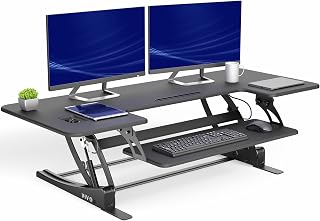
At 24 inches wide, the Elite fits into spaces where most converters won’t. It’s single-motor, so it’s slower (2–3 minutes to full height), but owners who’ve tested it in small apartments say the trade-off is worth it. Weight capacity is 25 pounds—fine for a laptop or small monitor, tight if you’re stacking a monitor arm on top.
Riser Stands (No Motor Needed)
If space is your absolute constraint and you don’t mind manual height adjustment, a riser stand costs less and takes up even less room.
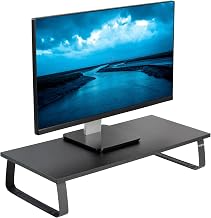
This is technically a riser, not a motorized converter, but it deserves mention for tight spaces. It’s 32 inches wide, holds dual 24-inch monitors or a single large one, and requires zero installation—just set it on your desk. Owners report it’s rock-solid, though you do have to physically lift it to change height. For someone who stands for 2–3 hours at a time and doesn’t need constant adjustment, it’s a no-fuss option.
Hybrid Converters (Compact Footprint, Dual Motor)
If you need to sit and stand multiple times a day but space is still tight, a hybrid converter balances speed, stability, and footprint.
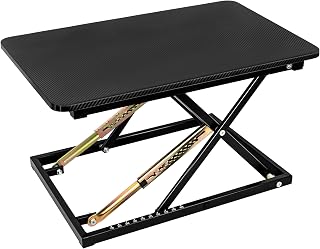
The Cooper is 36 inches wide—not tiny, but narrower than most full desks. It’s dual-motor, raises smoothly, and includes a padded keyboard tray that locks in place. Per owner reviews across multiple platforms, it’s one of the quietest converters available and feels premium without the premium price tag. The base is weighted, so it doesn’t slide when you lean on it.
Budget-Friendly Entry Point
If you’re testing the standing-desk waters and don’t want to spend big, IKEA’s motorized option is genuinely solid for the price.
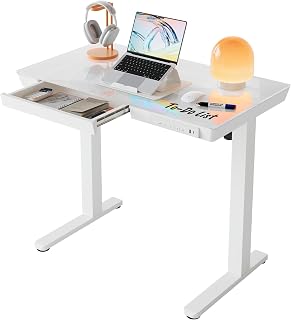
The IDASEN is a full desk, not a converter, but it’s worth mentioning because it’s compact (47 inches wide), motorized, and budget-tier. It’s not ideal if you already have a desk you love, but if you’re furnishing a small space from scratch, it’s a no-brainer. Owners report it’s stable, the motor is quiet, and it ships flat-pack—critical if you live in an apartment and stairs are your only option.
Setup Tips for Tight Spaces
Lift your monitor with an arm. A monitor arm like the Ergotron LX raises your screen 6–8 inches off the converter surface, freeing up desk real estate and improving neck posture. This is especially valuable in small spaces where every inch of surface matters. See Best Monitor Arm Under $100 for compact options that don’t add bulk.
Pair with an anti-fatigue mat. In a small space, you can’t pace while standing. An anti-fatigue mat reduces foot fatigue and keeps you engaged. Choose one under 3 feet wide so it doesn’t dominate the room. See Best Budget Anti-Fatigue Mats Under $50 for models that fit tight quarters.
Route cables down the side. Use adhesive clips along the desk edge and the converter base to bundle cables and route them down and out of sight. In a small space, visible cables make the room feel cramped.
Choose a narrow keyboard. A full-size keyboard eats real estate. Consider a 60% or 75% compact mechanical keyboard that gives you the same functionality in half the space.
Test the height range. Measure your standing elbow height before buying. A converter that only goes to 45 inches tall won’t work if you’re 6 feet tall. Most specs list the range; confirm it matches your proportions.
Converter vs. Full Standing Desk: Which for Small Spaces?
Converters and take 10 minutes to set up. Full standing desks and require 1–2 hours of assembly, plus dedicated floor space you may not have. Converters stack on your existing desk, fit in a closet when not in use, and can move with you if you change apartments. Full desks are sturdier and offer more surface area, but they’re impractical for anyone without a dedicated office.
For a detailed breakdown, see Standing Desk Converter vs Full Standing Desk: Cost Breakdown.
If you’re in a tiny apartment and considering a full redesign, How to Set Up a Standing Desk in a Tiny Apartment walks through the space-saving tricks that actually work.
Ergonomic Pairing: Converter + Accessories
A converter alone isn’t enough. To avoid wrist strain and back pain, prioritize these add-ons:
Must-haves for small spaces: - Monitor arm: Lifts your screen to eye level, reducing neck strain and freeing desk surface. This is essential in tight quarters. See Monitor Arm vs Monitor Stand: Which Saves Desk Space? for space-saving options. - Anti-fatigue mat: Reduces foot and leg fatigue when standing. Compact mats under 3 feet wide fit small spaces. See Best Budget Anti-Fatigue Mats Under $50.
Optional but helpful: - Split keyboard: If you have wrist pain, a split design keeps your forearms neutral. See Split Keyboard for Wrist Pain Relief. - Ergonomic chair: You’ll still sit half the day. See Best Cheap Office Chairs for Back Pain Relief for sub- options that don’t trash your back.
For a full setup guide, see Complete Budget Home Office Ergonomics Setup Under $500.
FAQ
Can I fit a converter on a 24-inch IKEA desk? No. A 24-inch desk is too narrow for most converters. The ApexDesk Elite Series (24 inches wide) is your only motorized option, and it leaves almost no room for a keyboard. Consider a riser stand like the Viozon instead, which is more compact and doesn’t require electricity.
What if my desk is wobbly? Don’t use a converter on it. The converter amplifies any instability in the base desk. Test your desk by pressing down hard on the edge—if it moves, reinforce it first (add corner brackets or a second support leg) or choose a different spot. A wobbly setup is unsafe and uncomfortable.
Do I need motorized, or is a manual riser enough? If you switch between sitting and standing every 30–60 minutes, motorized saves time and encourages more frequent changes. If you stand for 2+ hours at a time and rarely adjust, a manual riser like the Viozon is fine and costs less. Manual adjustment gets old fast if you’re doing it multiple times a day.
Will the converter’s motor be loud in a small apartment? The motor itself is usually quiet (under 50 decibels for dual-motor models). The real noise culprit is often your desk creaking or wobbling as the converter rises. If your desk is old or cheap, upgrading it may help more than upgrading the converter.
Can I use a converter in a dorm room? Yes. Converters are portable, don’t require installation, and take up less space than a full desk. Just confirm your desk is sturdy enough to handle the weight (25+ pounds) and that your roommate won’t mind the motor noise during early mornings or late nights.
Closing: Choosing Your Converter
The best standing desk converter for a small space is the one you’ll actually use. That means:
- It fits your desk. Measure twice, buy once.
- It’s quiet enough not to annoy neighbors or roommates.
- It’s stable enough to trust with your monitor.
- It costs what you can afford. A converter you use daily beats a one gathering dust.
Start with the scenario that matches your setup (dorm, apartment, shared office, phone booth) and pick the corresponding model from the quick picks above. If you’re unsure whether a converter is the right move, Sit-Stand Desk Converter vs Full Standing Desk breaks down the trade-offs.
Once you have your converter, pair it with a monitor arm and an anti-fatigue mat to complete the ergonomic picture. Small spaces demand intentional setups, but standing half the day is worth the effort.


